Case Study: C-Suite Office Security Review
Senior executives often work from office environments where corporate-managed devices coexist with personal systems, consumer networking equipment and connected workplace technology. Even where company-issued laptops and mobiles are well protected, weaknesses in the surrounding environment can affect confidentiality, resilience and organisational exposure.
This case study outlines a C-Suite Office Security Review conducted by ProCheckUp for a senior executive at a major international organisation. The engagement assessed the interaction between corporate assets, personal technology, wireless infrastructure, connected devices, credential practices and physical security within a live executive working environment.
Overview
The customer commissioned ProCheckUp to assess the security posture of an executive office environment in which corporate-managed systems operated alongside personal devices and consumer-grade network and connected technology.
The environment included Wi-Fi connectivity, a wireless extender, personal and corporate laptops and mobile devices, and connected equipment used for media streaming, printing and audio. Corporate devices were generally well controlled; however, unmanaged systems and consumer equipment introduced weaknesses in patching, password handling, device configuration, network segmentation and physical protection.
The overall exposure was assessed as medium-high. This reflected not only the individual weaknesses identified, but also the executive’s seniority, the sensitivity of information likely to be handled in the office, the combination of personal and corporate technology, and the possibility that a lower-trust device could create an indirect route towards director-level information or business systems.
Assessment at a glance
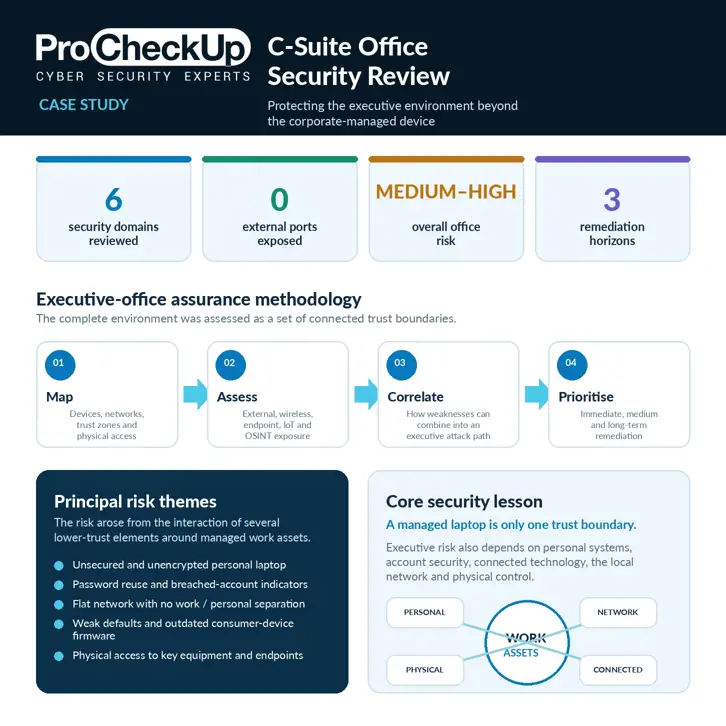
- - Six security domains reviewed: internal network, external perimeter, wireless, endpoints, physical security and OSINT exposure
- - Corporate and personal devices assessed as separate trust classes
- - Consumer networking, printing, media, audio and other connected devices included in scope
- - No externally exposed ports identified at the time of testing
- - Overall office-environment exposure assessed as medium-high
- - Immediate, medium-term and long-term remediation priorities provided
Challenge
The assessment needed to evaluate a high-profile executive working environment while preserving an important distinction: the customer’s managed corporate devices were generally well hardened, but they operated on local infrastructure shared with personal, consumer and connected systems that did not benefit from the same security governance.
A flat network design meant that a vulnerable extender, streaming device, printer or personal laptop could provide an attacker with opportunities for reconnaissance, credential capture or lateral movement. The risk was therefore determined by the security of the complete office ecosystem rather than by the corporate endpoint alone.
Physical access was also relevant. Connectivity equipment and some endpoint devices were accessible within the working area, while building-access routes, visitors and limited monitoring created residual opportunities for tampering, theft or unauthorised connection.
The engagement also needed to consider credential exposure. Evidence of password reuse and indicators associated with previously breached accounts could increase the likelihood of credential stuffing or targeted compromise of services used by a senior executive, even where the executive’s company-issued device remained properly managed.
Testing had to remain proportionate and non-disruptive. The office was a live working environment containing a combination of customer-managed and personal assets, so activities were designed to identify realistic attack avenues without interrupting normal operations or altering device configurations unnecessarily.
Requirements
The C-Suite Office Security Review was required to identify practical attack avenues that could compromise the executive office environment, expose sensitive information or create indirect risk to the customer.
The agreed review covered:
- - Internal network security and device-to-device exposure
- - External internet exposure and router behaviour
- - Wireless configuration, coverage and extender security
- - Corporate and personal laptop and mobile security practices
- - Consumer, media, printing, audio and other connected-device exposure
- - Physical access to key systems and network equipment
- - Open-source intelligence and credential-exposure indicators
The final output needed to distinguish customer-managed controls from risks introduced by personal or shared technology, explain how the findings could affect an executive, and provide prioritised immediate, medium-term and long-term remediation actions.
Solution
ProCheckUp conducted an onsite assessment across the physical environment, wireless setup, local network, external perimeter, endpoint practices and authorised OSINT footprint.
The external review first established that no ports or services were directly exposed to the internet at the time of testing. Attention then moved to internal trust relationships, endpoint hygiene, insecure defaults, consumer-device configuration, credential practices and the absence of network segmentation.
Corporate devices were reviewed separately from personal systems. This preserved the distinction between company-managed security controls and environmental risks introduced by unmanaged technology. It also allowed recommendations to focus on preventing lower-trust devices from affecting corporate work assets rather than treating every device as though it were governed in the same way.
Findings were translated into practical controls suited to an executive office: harden or replace weak consumer devices, create a dedicated network for work assets, improve password and account-security practices, update and encrypt personal systems, disable unnecessary services, and reduce physical access to key infrastructure.
The assessment followed four stages:
- 1. Map: identify devices, connectivity, trust relationships, physical access points and the separation between corporate, personal and connected technology.
- 2. Assess: review external exposure, wireless security, endpoint hygiene, internal services, consumer-device configuration and relevant OSINT indicators.
- 3. Correlate: consider how individual weaknesses could combine, such as a vulnerable connected device on a flat network alongside a personal laptop containing reused credentials.
- 4. Prioritise: convert the technical findings into immediate containment actions and a sustainable executive-office security model.
Vulnerabilities Identified
Personal laptop exposure
A personal Windows laptop did not have a login password, was missing security updates and did not use full-disk encryption. This created a direct risk of data, browser-session or credential theft if the device were accessed physically, compromised remotely or lost.
The weakness was particularly relevant because personal systems can contain saved passwords, email sessions, documents and browsing history associated with both private and professional activity. Even where corporate work is intentionally conducted on a separate managed device, information held by the personal system may still support social engineering or account compromise.
Password handling and breached-account indicators
The review identified evidence of password reuse and indicators that accounts associated with the executive had appeared in known third-party data breaches. Password reuse increases the chance that credentials obtained from one unrelated service can be used to target more sensitive accounts.
For a senior executive, successful credential stuffing can affect not only personal services but also email recovery paths, travel and communications accounts, professional platforms and other services that may contain useful information for targeted fraud or impersonation.
Flat internal network and weak service configuration
The office network did not provide effective separation between work assets, personal devices and connected technology. This increased the potential impact of a compromise affecting any one device.
A wireless extender had not been fully configured and required firmware updates. SMB signing was not enforced on one system, and several devices exposed weak or unnecessary local services. Individually, these issues were not evidence of compromise; collectively, they increased opportunities for local reconnaissance, traffic manipulation and lateral movement.
Consumer and connected-device risk
Printer settings, media and audio equipment, UPnP support, Bluetooth discoverability, weak hotspot configuration and default administrative credentials contributed to a wider office attack surface.
Consumer and Internet of Things devices are often less frequently patched than corporate endpoints and may provide limited security monitoring. When they share the same network as work systems, a weakness in a low-value device can become relevant to higher-value assets.
Physical security
Key devices and connectivity equipment were accessible within the office area. Limited alarm or camera coverage, visitor access and other building-access routes created residual risks that could be reduced through secure storage, stronger locks, improved monitoring and clearer visitor controls.
Physical access can bypass otherwise effective cyber controls. An attacker or unauthorised visitor may be able to connect a device, reset consumer networking equipment, remove storage, observe sensitive information or tamper with infrastructure.
External perimeter and automatic port exposure
No externally accessible infrastructure issue was identified during the assessment. This was a positive finding and reduced the likelihood of direct internet-based exploitation at the time of testing.
However, UPnP support on the broadband router meant that a local application or connected device could potentially create an external port mapping automatically. Disabling unnecessary automatic port-mapping features would reduce the chance of future ad hoc exposure.
Risk in Context
The assessment did not indicate that the customer’s corporate endpoint controls had failed. Instead, it demonstrated that executive security depends on several overlapping trust boundaries:
- - The security of company-issued laptops and mobile devices
- - The security and patching of personal systems
- - The configuration of routers, extenders and wireless networks
- - The behaviour of printers, media equipment and other connected devices
- - Password uniqueness, multi-factor authentication and account-recovery security
- - Physical control of the workspace and its infrastructure
A well-managed corporate laptop can therefore remain exposed to indirect risk if it operates within a flat, weakly governed local environment. The appropriate control model is not to assume that every device is trusted, but to reduce unnecessary connectivity and contain lower-trust technology.
Potential Exposure Path
The findings supported a plausible risk path in which a weakness outside the managed corporate estate could affect the executive’s wider security. This was a risk scenario used to prioritise controls; it was not evidence that an actual compromise had occurred.
- A lower-trust device is compromised: an unpatched personal system, extender or connected device provides the initial foothold.
- The flat network enables discovery: the attacker identifies neighbouring systems, shared services and local traffic.
- Weak configuration expands access: insecure defaults, unnecessary services or automatic port mapping increase the available attack surface.
- Credentials or sessions are targeted: reused passwords, saved sessions or breach-derived account information support impersonation or account takeover.
- Executive and organisational risk converge: access to communications, documents or trusted relationships may be used for fraud, social engineering or indirect targeting of corporate services.
Recommendations
Immediate actions
- - Set a strong, unique login password on the personal laptop
- - Apply outstanding operating-system and application security updates
- - Enable full-disk encryption on the personal laptop and securely store the recovery key
- - Update the wireless extender and connected media-device firmware
- - Configure the extender with unique administrative and wireless credentials
- - Change any remaining default router, extender, printer or device passwords
- - Review accounts associated with known breach indicators and rotate reused passwords
Medium-term actions
- - Create a dedicated, strongly protected network or VLAN for corporate work devices
- - Place personal, guest and connected devices on separate networks with restricted communication between them
- - Disable UPnP, WPS and unnecessary local services
- - Enforce appropriate Windows hardening, including SMB-signing controls where supported
- - Use a reputable password manager to generate and store unique passwords
- - Apply strong multi-factor authentication to important personal and professional accounts
- - Reduce Bluetooth discoverability and harden mobile-hotspot settings
- - Move routers, extenders and other key equipment into secured or access-controlled locations
Long-term actions
- - Maintain an inventory of office networking, personal and connected devices
- - Define minimum firmware, encryption and password standards for technology used around executive work assets
- - Replace consumer devices that no longer receive security updates
- - Conduct periodic reviews of privileged accounts, breach exposure and executive OSINT risk
- - Reassess the office after material changes to the network, building, executive role or device estate
- - Include executive office environments within broader protective-security and incident-response planning
Outcome
The engagement confirmed that the executive followed a strong separation model for core corporate work by using dedicated company-issued devices. It also demonstrated that executive risk is not limited to those managed endpoints: the surrounding network, personal laptop, account credentials, connected equipment and physical controls materially influenced the overall security posture.
ProCheckUp provided a prioritised remediation plan. The most urgent actions addressed the unsecured and unencrypted personal laptop, outstanding software and firmware updates, wireless-extender configuration, default credentials and accounts affected by password reuse or breach exposure.
The medium-term recommendations focused on reducing implicit trust. Separating corporate work devices from personal, guest and connected systems would limit reconnaissance and lateral movement if a lower-trust device were compromised. Disabling unnecessary features such as UPnP and WPS, improving password management, enforcing encryption and strengthening physical controls would further reduce attack opportunities.
The review gave the customer a practical basis for extending executive protection beyond the managed device. Rather than treating the office network as a trusted extension of the corporate environment, the recommended model assumes that personal and connected devices may fail and uses segmentation, strong identity controls and physical protection to contain their impact.
The Core Security Lesson
The most important lesson is that a secure corporate laptop does not, by itself, create a secure executive working environment.
Senior leaders are attractive targets because their devices, accounts and conversations may provide access to commercially sensitive information, strategic decisions, privileged relationships and high-value fraud opportunities. Attackers may therefore choose the least protected part of the executive’s wider environment rather than attacking the managed corporate endpoint directly.
The relevant question is not simply:
“Is the executive’s company-issued device secure?”
It is:
“Can a weakness in the surrounding network, personal technology, credentials, connected devices or physical environment be used to reach, observe or impersonate the executive?”
How ProCheckUp Helps
ProCheckUp’s C-Suite Office Security Review provides an independent assessment of the environments from which senior leaders work. It complements enterprise endpoint and identity controls by examining the local technology and physical conditions that sit outside normal corporate management.
A review can include:
- - Executive office and remote-working environment assessment
- - Internal, external and wireless security testing
- - Review of corporate, personal and connected-device trust boundaries
- - Router, extender, printer and consumer-device configuration assessment
- - Endpoint patching, encryption and account-security review
- - Physical security and infrastructure-access assessment
- - OSINT, credential-exposure and impersonation-risk review
- - Prioritised remediation guidance and verification testing
Conclusion
This assessment showed how apparently modest weaknesses around personal devices, consumer networking and physical access can combine into meaningful risk for a senior executive and the organisation they lead.
By separating work assets, securing personal systems, removing insecure defaults, improving account hygiene and controlling access to local infrastructure, organisations can substantially reduce the chance that an executive office becomes an indirect route to sensitive information or corporate services.
To discuss a C-Suite Office Security Review or a wider executive-protection assessment, contact ProCheckUp.
Discuss a similar assessment
See our tscm and bug sweeping services uk or contact ProCheckUp to discuss your scope.
Need Help?

If you have any questions about cyber security or would like a free consultation, don't hesitate to give us a call!
For More Information Please Contact Us
ACCREDITATIONS