Case Study: Scenario Based Build Review Test — Windows 11 & Azure Virtual Desktop
This case study outlines an active ProCheckUp review of a standard Windows 11 laptop build and an Azure Virtual Desktop environment. The assessment examined whether firewall, credential, certificate, application-control and endpoint-protection controls continued to work when exercised from realistic standard-user and simulated elevated attacker perspectives.
Overview
A large UK enterprise commissioned ProCheckUp to assess the security configuration and attack resilience of a corporate Windows 11 laptop build and a cloud-hosted Azure Virtual Desktop build.
The objective was not simply to confirm that firewalls, antivirus, cloud protection and system policies were present. The review tested whether those controls materially constrained an attacker operating from a compromised endpoint and how far the blast radius increased after simulated local privilege escalation.
Testing began from a standard domain-user context on both build types. Selected physical-laptop tests were then repeated from a local-administrator context to model a successfully compromised host. The virtual-desktop work also considered breakout risk and the surrounding Azure landing-zone network and firewall boundary.
The assessment identified broad weaknesses across firewall configuration, credential and certificate protection, privilege pathways, application enforcement, phishing resistance and data-exfiltration controls. Several controls existed but were permissive, audit-only or undermined by accessible authentication material and unsafe execution paths.
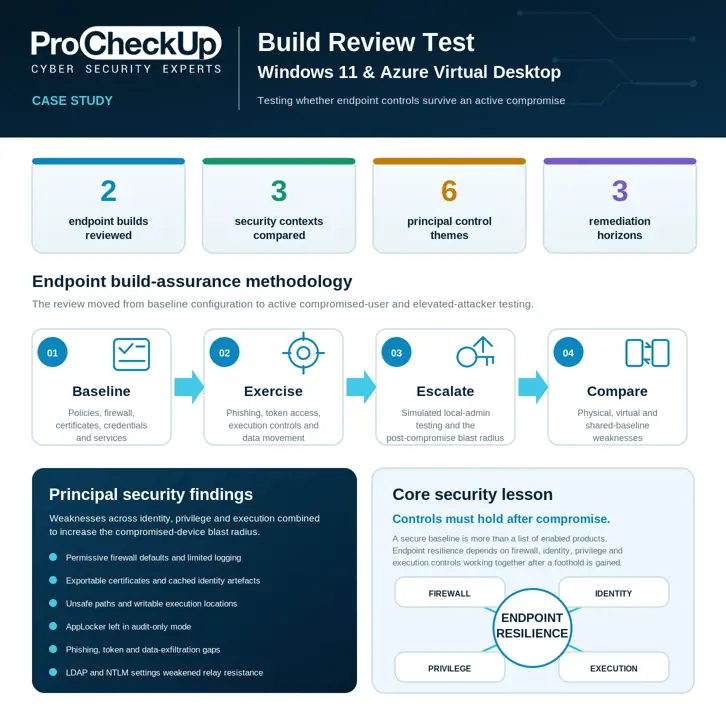
Engagement at a glance
- - Two representative endpoint builds: a physical Windows 11 laptop and Azure Virtual Desktop
- - Three security contexts compared across standard-user and simulated elevated access
- - Manual configuration review combined with controlled attacker-behaviour testing
- - Six connected control themes requiring coordinated remediation
- - Immediate, medium-term and long-term remediation priorities
- - Customer and infrastructure identifiers removed from this publication
Challenge
A modern scenario based build review must establish more than whether a setting exists. It must also determine whether the combined endpoint controls still resist realistic attack behaviour after phishing, malware execution or unauthorised user access has established an initial foothold.
Configuration evidence was not enough
Firewall, antivirus, application-control and cloud-security settings had to be actively exercised rather than accepted at face value. A control configured in audit mode, a certificate stored with an exportable key or a firewall that lacked useful logging could appear operational while providing limited containment during an security breach.
Two builds had different trust boundaries
The physical domain-joined laptop and the Azure Virtual Desktop instance inherited different network, policy, virtualisation and cloud-boundary characteristics. The same methodology therefore had to be applied consistently while interpreting findings separately for each platform.
Privilege changed the security question
Standard-user testing established the initial attacker opportunity. Local-administrator testing then showed which protections remained effective after a successful privilege-escalation event, without requiring domain-administrator access or assuming control of the wider enterprise.
Requirements
The Scenario Based Build Review Test included the following technical and operational requirements:
- - Review a representative corporate Windows 11 laptop and an Azure Virtual Desktop build
- - Test unauthorised access, phishing, patching, malware-control and data-exfiltration scenarios
- - Assess privilege-escalation opportunities from a standard domain-user context
- - Repeat selected physical-build tests from a local-administrator context to model post-compromise capability
- - Perform virtual-desktop breakout-oriented testing and review the surrounding Azure network and firewall boundary
- - Examine firewall state, certificate stores, Kerberos tickets, DPAPI artefacts, application control and Group Policy
- - Support findings with registry output, command evidence and screenshots
- - Provide CVSS-based prioritisation and an immediate, medium-term and long-term remediation roadmap
Testing was controlled and non-destructive. The authorised attacker model used was used to validate control effectiveness; it does not indicate that an actual compromise had occurred.
Solution
ProCheckUp combined manual configuration analysis with native Windows inspection and controlled attack simulation across the physical and virtual builds. Testing was first performed as a standard domain user and then, where authorised, repeated from a local-administrator context.
The assessment followed four stages:
- 1. Baseline: enumerate policies, firewall state, certificates, credential stores, services, patching and endpoint-protection configuration.
- 2. Exercise: test the standard-user build against phishing, token access, application-control evasion, data movement and local attack paths.
- 3. Escalate: repeat selected tests from a simulated local-administrator context to establish the post-compromise blast radius.
- 4. Compare: correlate physical and virtual build results, distinguish shared baseline problems from platform-specific weaknesses and prioritise remediation.
Manual evidence was prioritised over automated benchmark output alone. Findings were separated by build and user context so that a control weakness observed from a standard user was not conflated with capability requiring local-administrator access.
Vulnerabilities Identified
The review identified a systemic set of High, Medium, Low and Informational issues. The most consequential findings are grouped below by control theme rather than by internal hostname.
Firewall and network protections — High impact
The physical build used permissive inbound firewall defaults, insufficient logging and reduced stealth behaviour. Comparable weaknesses were identified in the virtual build, where broad inbound NTLM handling further increased exposure.
Security impact: network reconnaissance and inbound attack opportunities increased, while incomplete logging reduced the evidence available for detection and incident investigation.
Recommendation: enforce deny-by-default inbound policy, enable useful dropped-packet and connection logging, restore stealth protections and govern physical and virtual firewall baselines through one controlled standard.
Exportable certificates and identity artefacts — High and Medium impact
Client-authentication and device-management certificates were present with exportable private keys. Cached Kerberos tickets, DPAPI master-key material, browser authentication traces and cloud-service tokens widened the endpoint’s identity blast radius.
Security impact: an attacker with access to the user context could gain opportunities for certificate or device impersonation, Pass-the-Ticket activity, offline credential recovery and access to cloud services beyond the local endpoint.
Recommendation: reissue certificates with non-exportable keys, minimise cached authentication material, remove sensitive browser and cloud-token artefacts, and monitor for unusual certificate and token reuse.
Privilege-escalation pathways — High impact
Unsafe unquoted execution paths and autorun configuration created binary-planting opportunities on the physical build. Registry-controlled DLL search behaviour, unnecessary local administrator accounts and writable scheduled-task locations introduced additional elevation paths across the two platforms.
Security impact: a low-privilege foothold could progress towards SYSTEM-level execution or durable local control without requiring a single software vulnerability.
Recommendation: quote and permission executable paths, correct writable task and registry locations, remove unnecessary local administrators and deploy Microsoft LAPS correctly for approved local-administrator accounts.
Application and malware controls — High and Medium impact
AppLocker operated in audit-only mode, leaving a large native execution surface available. Hundreds of living-off-the-land binaries remained usable, obfuscated tooling bypassed expected malware-control behaviour in the virtual build, and Controlled Folder Access was bypassable from the elevated physical test context.
Security impact: policy generated visibility without reliably preventing execution, allowing signed native tools and obfuscated payloads to support discovery, staging, evasion and data movement.
Recommendation: move AppLocker through a monitored pilot into enforcement, constrain high-risk native tools, strengthen behavioural detection and verify that elevated users cannot trivially disable or bypass ransomware protections.
Phishing and data-exfiltration controls — Medium and lower impact
Testing identified selected phishing-filter bypass conditions and sensitive authentication information within browser history and local cloud-service files. These artefacts could support follow-on access or movement of data through collaboration and storage platforms.
Recommendation: strengthen mail-control testing, remove token-bearing artefacts from user-accessible storage, extend Data Loss Prevention coverage and exercise controls against modern cloud-storage and collaboration workflows.
Legacy authentication configuration — High impact
LDAP signing was configured to negotiate rather than require on both builds. The virtual environment also permitted broad inbound NTLM behaviour.
Security impact: these settings weakened resistance to credential relay, downgrade and man-in-the-middle attack paths.
Recommendation: enforce LDAP signing and channel protections, reduce NTLM exposure in a compatibility-tested programme and monitor remaining legacy-authentication use.
Physical and Virtual Build Reviews
Physical Windows 11 laptop
- - Permissive firewall defaults, disabled or incomplete logging and reduced stealth behaviour
- - Exportable certificates, cached Kerberos tickets, DPAPI artefacts, browser traces and cloud tokens
- - Unsafe autorun and execution paths, DLL search behaviour and unnecessary local administrators
- - AppLocker audit-only operation, broad living-off-the-land capability and elevated Controlled Folder Access bypass
Azure Virtual Desktop
- - Comparable firewall and LDAP-signing weaknesses within a cloud-hosted boundary
- - Broad inbound NTLM handling and writable scheduled-task locations
- - Cached credential and token themes requiring virtual-build hardening
- - AppLocker audit-only operation, extensive native execution capability and obfuscation-based antivirus bypass
The comparison showed that separate platform teams could inherit the same weak baseline. Remediation therefore required a governed endpoint standard and platform-specific validation rather than isolated host fixes.
Compromised-Device Pathway Modelling
The review correlated individual weaknesses into a plausible compromised-device pathway:
- 1. Initial access: phishing, malware or unauthorised device access establishes a standard-user session.
- 2. Build enumeration: native tooling reveals policies, services, certificates, writable paths and available binaries.
- 3. Identity recovery: tickets, DPAPI stores, exportable keys and cloud tokens expand attacker options.
- 4. Privilege escalation: unsafe execution paths or writable task locations support elevated code execution.
- 5. Control bypass: audit-only application policy and native signed tools support execution and evasion.
- 6. Service access: recovered authentication artefacts extend access beyond the local endpoint.
- 7. Exfiltration or pivot: the compromised build becomes a route to sensitive data, cloud services or adjacent systems.
Outcome
The engagement gave the customer one prioritised view of risk across its physical and virtual endpoint estates, allowing security and IT operations teams to distinguish urgent identity exposure from longer-term baseline and governance work.
The review showed that weaknesses in firewall configuration, credential and certificate handling, privilege controls, application enforcement, phishing resistance and data-exfiltration protection could combine to support sensitive-data theft, fraudulent access, operational disruption, regulatory exposure and reputational harm in a compromised-device scenario.
Testing the standard-user context before introducing local-administrator capability demonstrated both the initial attacker opportunity and the additional blast radius created by successful elevation. Comparing the physical laptop with Azure Virtual Desktop also showed which issues were inherited from a shared baseline and which required platform-specific remediation.
The customer received a concrete remediation roadmap to close privilege-escalation paths, protect identity artefacts and move controls from passive visibility to active enforcement before the next review cycle.
Remediation Priorities
Immediate containment
- - Remove or rotate exposed credentials and cloud-service tokens
- - Reissue client certificates with non-exportable private keys
- - Clear unnecessary cached tickets and sensitive browser artefacts
- - Harden firewall defaults and enable useful security logging
- - Correct unsafe file, registry and scheduled-task permissions
- - Remove unnecessary or legacy local administrator accounts
Medium-term build hardening
- - Apply a governed Windows security baseline through Group Policy or equivalent management
- - Deploy Microsoft LAPS for local-administrator credential management
- - Move AppLocker from audit-only to staged enforcement
- - Enforce LDAP signing and reduce NTLM exposure
- - Strengthen endpoint protection against obfuscated and living-off-the-land execution
- - Extend Data Loss Prevention controls across collaboration and cloud-storage workflows
Long-term assurance
- - Maintain one controlled baseline across physical and virtual endpoints
- - Improve segmentation between endpoint, user, cloud and administrative trust zones
- - Integrate richer endpoint telemetry with central SIEM detection and response
- - Exercise incident response against token theft and compromised-device scenarios
- - Sustain phishing awareness and technical control validation
- - Repeat build reviews after material changes and on a defined assurance cycle
The Core Security Lesson
A build is only secure if its controls still hold after the user context is compromised.
Baseline compliance remains useful, but active build review reveals whether firewall, identity, privilege, application and monitoring controls work together when an attacker operates from the endpoint.
The correct question is not simply:
“Does the device have the required security products and policies?”
It is:
“What can an attacker still do after gaining a standard-user foothold, and what changes after privilege escalation?”
How ProCheckUp Helps
ProCheckUp’s Build and Configuration Reviews assess standard endpoint, server and virtual-desktop builds against recognised hardening expectations and real attacker behaviour. Support can include:
- - Windows, Linux, macOS, server and virtual-desktop build review
- - Standard-user and simulated elevated attacker testing
- - Firewall, endpoint-protection and application-control validation
- - Credential, certificate, token and local-secret exposure analysis
- - Privilege-escalation and unsafe-permission testing
- - Virtual desktop breakout and cloud-boundary review
- - Phishing, data-exfiltration and living-off-the-land assessment
- - Security-baseline design, remediation advice and verification testing
Related services include Build and Configuration Reviews, Breakout Testing and Laptop and Mobile Devices Security Reviews.
Conclusion
This engagement demonstrated why endpoint assurance cannot be reduced to a configuration checklist. The decisive question was whether multiple layers of control continued to contain an attacker after a user context was compromised and, separately, after local privilege had been gained.
By correcting exposed identity material and unsafe permissions first, moving audit-only controls into enforceable policy, strengthening legacy authentication settings and maintaining one testable baseline across physical and virtual endpoints, organisations can materially reduce the blast radius of a compromised device.
To discuss a Windows build review, Azure Virtual Desktop assessment or compromised-endpoint simulation, contact ProCheckUp.
Discuss a similar assessment
See our secure build review services or contact ProCheckUp to discuss your scope.
Need Help?

If you have any questions about cyber security or would like a free consultation, don't hesitate to give us a call!
For More Information Please Contact Us
ACCREDITATIONS