What is Cyber Essentials and Cyber Essentials Plus?
Cyber Essentials is a UK government-backed certification scheme that helps organisations protect against common internet-based attacks. It focuses on five technical controls applied across an agreed scope.
Cyber Essentials uses a verified online self-assessment. Cyber Essentials Plus adds independent technical testing to check that those same controls work in practice. Neither guarantees protection against every attack or replaces a complete security programme.
Scope and the five controls: a brief overview
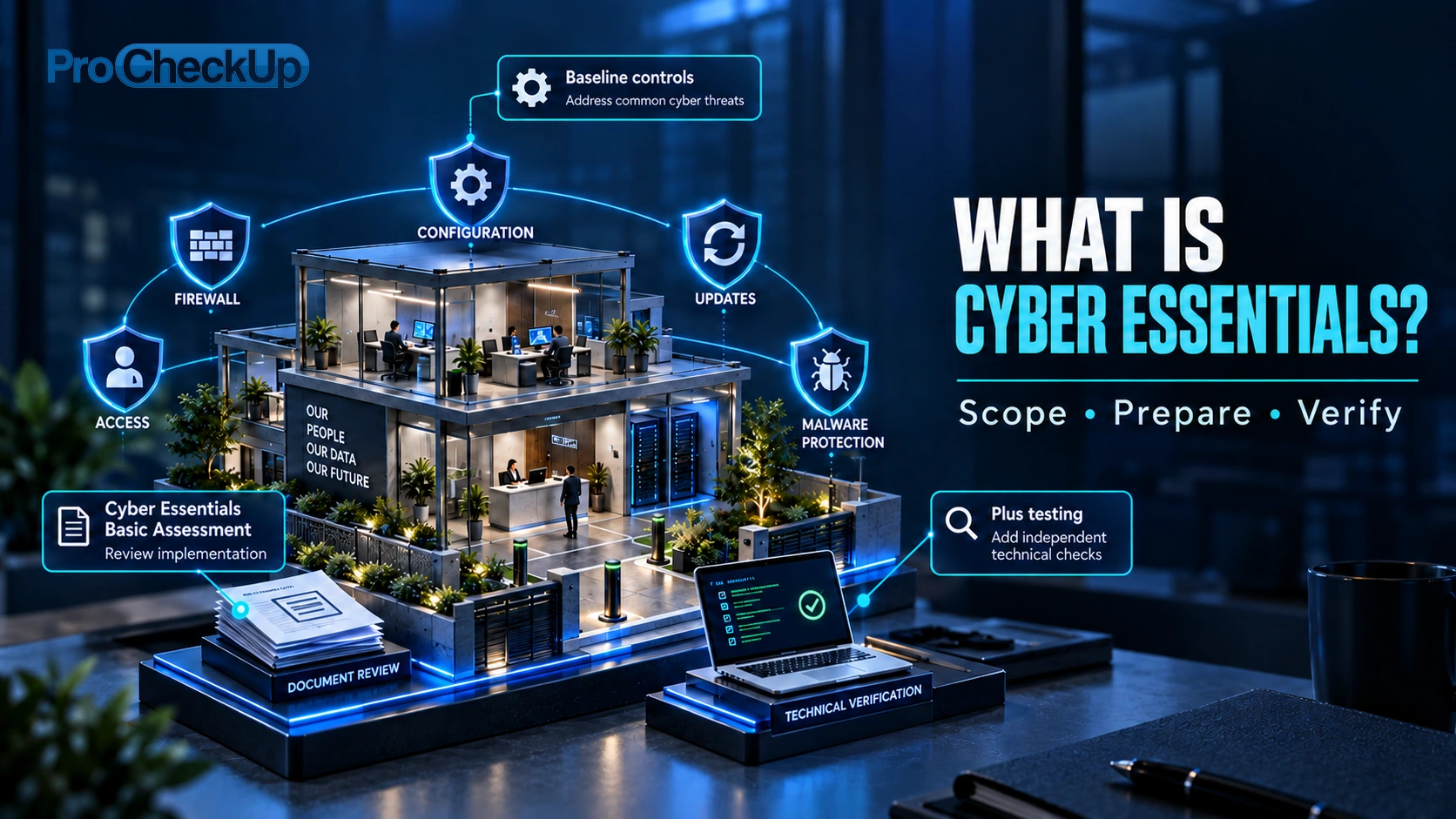
Scope means the IT included in your assessment: the devices, software, networks and cloud services used for your business. Aim to cover the whole organisation; if necessary, agree a clearly defined, separately managed subset with your Certification Body. Include relevant home-working and personal devices, and business cloud services. Explain any exclusions. See the scope rules and examples.
The five controls protect that scope in different ways:
- Firewalls: control network connections so only necessary services are exposed to the internet.
- Secure configuration: replace insecure defaults and remove unnecessary accounts, software and services.
- User access control: give people only the access they need, protect sign-ins and remove access when it is no longer needed.
- Malware protection: use suitable protection to detect or prevent malicious software from running.
- Security update management: use supported software and install security fixes within the required deadlines.
Apply all five across the agreed scope. For the formal conditions and permitted options, use the current NCSC requirements; the sections below explain what to check and what evidence to keep.
Reviewed: 29 October 2026.
New applications from 27 April 2026 use the Danzell question set and requirements version 3.3. Prepare against the applicable documents rather than copying an old questionnaire. Download the current questions and requirements from IASME.
How do Cyber Essentials and Plus differ?
| Cyber Essentials | Cyber Essentials Plus |
|---|---|
| Assessed self-assessment of the five technical controls. | The same baseline, with independent technical verification. |
| Prepare accurate answers supported by evidence. | Prepare for the agreed technical checks as well as meeting the baseline. |
| Confirm scope and current questionnaire with the certification body. | Confirm the scope, prerequisites and timing with the certification body. |
Define the scope before answering the questions
Include the organisation’s IT as a whole, or a clearly defined, separately managed subset agreed with the certification body. Explain any exclusions. A certificate for a subset should not be presented as assurance for excluded operations.
Record the business unit responsible for the scope, its network boundary and physical locations. Agree these boundaries with your Certification Body before assessment begins. If using a subset, explain its separation and the reasons for exclusions.
Cloud services holding or processing organisational information are part of the scope. Identify which controls the provider operates and which you must configure; obtain evidence of the provider’s commitments. End-user devices cannot simply be excluded to avoid difficult requirements.
User-owned devices that access organisational data or services are in scope, subject to the scheme’s stated exceptions. Devices used only for native voice calls, native text messages or MFA applications are excluded. Remote and hybrid working therefore need an actual device and service inventory, not a statement that “everything is in the cloud”.

Which devices and software are covered?
Within the agreed scope, the requirements apply to devices and software that can:
- Receive connections from internet-connected devices.
- Make connections to other devices through the internet.
- Control internet traffic for those devices, such as a router or firewall.
This includes relevant end-user devices, not just public-facing servers. Cloud services hosting organisational data or services must also be included. Use the v3.3 scope rules for the full conditions and exceptions.
| Inventory | Record |
|---|---|
| Devices and software | Owner, operating system, version, support status and how updates are deployed. |
| Accounts and services | Users, administrators, cloud services and supplier-managed access. |
| Boundaries | Networks, remote access, locations and any proposed exclusion with its justification. |
Use the v3.3 requirements for the exact scope and control conditions.
Scope examples: home working, cloud and suppliers
| Situation | What to check |
|---|---|
| A personal phone used for work email | Include the device in the scope review. The MFA-only exception does not apply once it also accesses business email. |
| A home worker’s router | An organisation-supplied router is in scope. A personally supplied or ISP home router is normally excluded; the work device still needs appropriate firewall protection. |
| A cloud office suite or hosted application | Record the service, users and administrator accounts. Identify who configures security and obtain the provider’s relevant commitments. |
| An IT company managing your environment | Your organisation’s accounts remain in scope even when a supplier uses them. Distinguish those accounts from the supplier’s own devices when agreeing scope. |
The v3.3 scope rules cover additional cases, including devices used by third parties. Ask about ambiguous cases before submitting.
A useful supplier question: “For each control, what do you manage, what must we do, and what current evidence confirms it?” Keep the answers with the service inventory. Outsourcing IT does not transfer the applicant’s responsibility for accurate answers. IASME explains applicant responsibility.
The five controls: practical work and evidence
| Control | Practical work | Useful evidence |
|---|---|---|
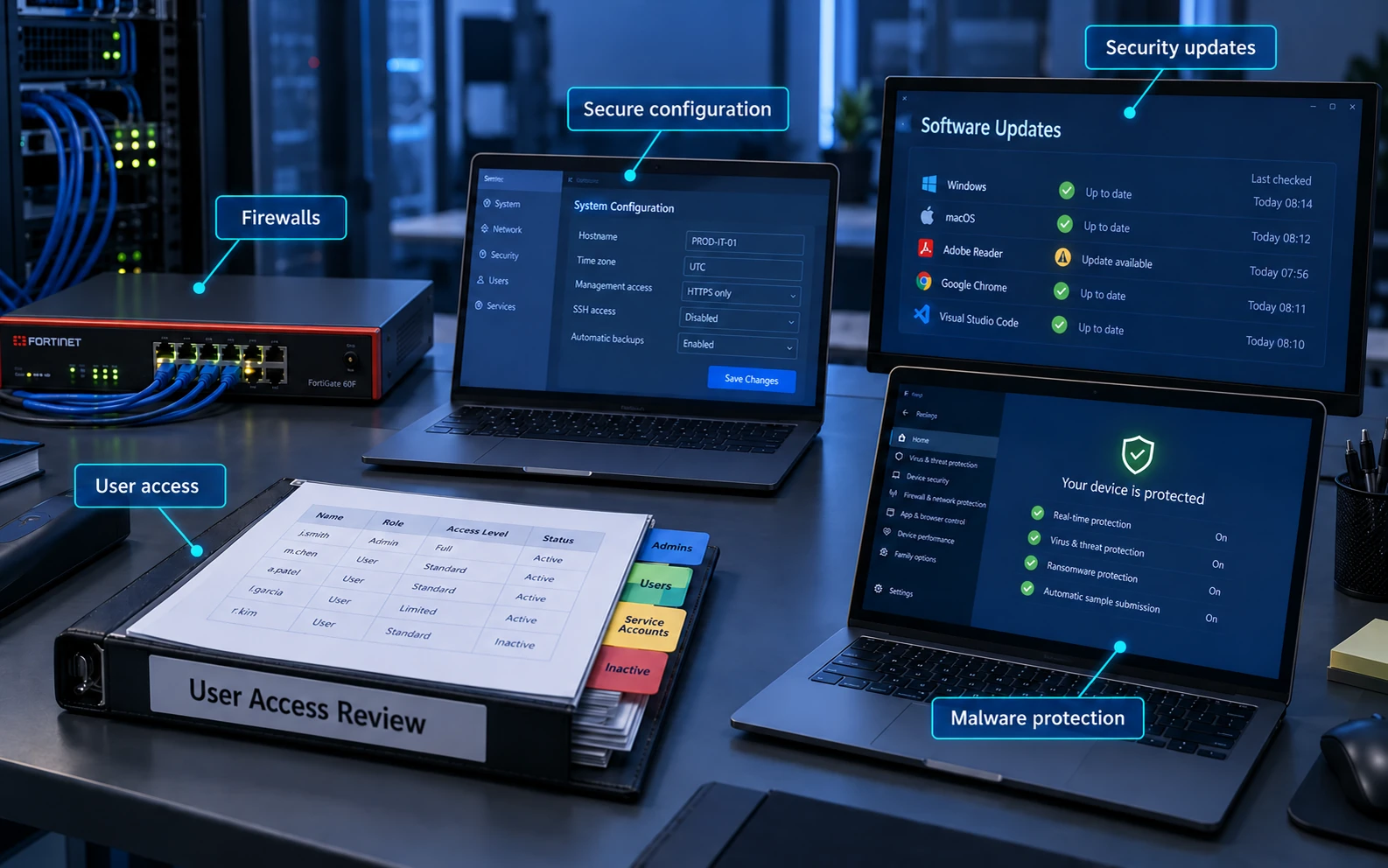
| Firewalls | Control connections and remove unnecessary exposure; protect administration. | Rules, ownership, change approvals and a record of necessary services. |
| Secure configuration | Remove unneeded services and accounts; replace insecure defaults. | Build settings, account inventories and checks on representative devices. |
| User access control | Approve access, limit privileges, remove obsolete access and apply required authentication. | Joiner/leaver records, privileged-account review and MFA coverage. |
| Malware protection | Apply an appropriate protection approach for the device and platform. | Deployment and health evidence, policy settings and handling of exceptions. |
| Security update management | Use supported software and deploy required security updates promptly. | Software/support inventory, deployment dates and verification of installation. |
The five controls explained
Each control below sets out its objective, an introduction and a summary of the requirements, followed by practical checks and evidence. The numbered order follows this article; the scheme’s control names remain unchanged.
Check the official v3.3 technical requirements for the precise scope, platform-specific options and assessment rules. Keep your preparation notes in the same order as the applicable questionnaire so the person signing the answers can trace them to observed facts.
1. Firewalls and permitted connections
Objective
Reduce unnecessary access from the internet. A firewall filters connections against rules; this can protect a network boundary, an individual device or a cloud service.
Introduction
A device may offer services such as a website, file sharing or remote administration. Firewall rules control which network connections can reach those services. Boundary firewalls protect a network; software firewalls protect individual devices. Cloud traffic policies can perform a similar role for hosted services.

Requirements
- Protect every in-scope device with a correctly configured firewall or equivalent firewall functionality. This can be provided at the network boundary or on the device, as appropriate.
- Replace default firewall administrator passwords with strong, unique ones, or disable remote administration completely.
- Keep the management interface inaccessible from the internet unless there is a documented business need. Where access is necessary, protect it with MFA, or a narrowly restricted trusted-IP allowlist together with properly managed password authentication.
- Deny unauthenticated incoming connections unless an explicitly approved rule permits the necessary service.
- Have an authorised person approve and document inbound rules, including the business justification.
- Delete or disable permissions once the service or business need ends.
- Use a software firewall when a device connects through a network the organisation does not control, including public Wi-Fi.
Requirements summary: NCSC v3.3, pages 13–14. See also IASME’s firewalls explanation. Use the current scheme documents for all conditions.
Practical checks and evidence
Identify the boundary controls, host firewalls and cloud traffic policies covering the in-scope environment. Record why each allowed connection is needed and who owns it. Remove obsolete permissions, protect administration and verify the effective rules rather than relying on an old network diagram. Devices used on networks the organisation does not control need appropriate local protection.
- Check that the intended firewall is enabled on each relevant device or boundary, including laptops used away from the office.
- Review incoming permissions with the service owner: record the business reason, approval and who will remove a temporary rule.
- Check how firewall administration is protected and who can change it. Do not confuse the administrator password with the Wi-Fi password.
- Check the default rule: unauthenticated incoming connections must be blocked unless a necessary, approved rule permits them.
- Replace factory administrator passwords with strong, unique ones, or disable remote administration entirely. Keep the management interface off the internet unless there is a documented business need; where needed, use MFA or a limited trusted-IP allowlist with properly managed password authentication.
The v3.3 firewall requirements specify the permitted administration protections; an exposed management page with only a password is not sufficient.
Evidence example: a dated rule export and a short review record explaining the permitted services. IASME firewall guidance explains the different firewall types.
Example: identify the equipment enforcing the rules

2. Secure configuration
Objective
Reduce the weaknesses present in default settings. Unused accounts, unnecessary software and insecure settings can create ways into a device or service.
Introduction
A new device or service may include unused accounts, unnecessary features or weak initial settings. Secure configuration establishes what the business actually needs and turns off the rest. Apply the same discipline when equipment is issued, repurposed or changed.

Requirements
- Remove or disable accounts that have no business purpose, including unused guest and administrator accounts.
- Replace default or easily guessed passwords and apply the relevant authentication rules.
- Uninstall or disable unneeded applications, utilities and network services.
- Turn off features that run downloaded or removable-media files without the user authorising execution.
- Require authentication before access to business data or services.
- Configure device locking and protect unlocking against repeated guesses. For a password or PIN used only to unlock the device, use at least six characters; if it also authenticates to a service, apply the full account-password rules.
- Where configurable, restrict unlocking to no more than ten guesses in five minutes or lock after no more than ten failed attempts. Use the vendor default where the vendor provides no configuration option.
Requirements summary: NCSC v3.3, pages 14–16. See also IASME’s secure configuration explanation. Use the current scheme documents for all conditions.
Practical checks and evidence
Create an approved starting configuration for each relevant device or service role. Remove unnecessary accounts, software and services; change insecure defaults and require appropriate authentication. Check a newly issued laptop and an older one against the intended configuration. A deployment template is useful only if the devices actually receive and retain its settings.
- Check what is installed and enabled on a real device, then remove or disable unnecessary software, services and accounts.
- Check device locking and the protection against repeated unlock attempts. Use the current requirements for the exact credential rules.
- Disable automatic file execution that bypasses user authorisation, and verify that the setting has reached the devices.
Evidence example: a configuration profile plus a check of its effective settings on a new and an existing laptop. IASME secure-configuration guidance provides further context.
Put the configuration standard into everyday use. The practical workflow below expands the original configuration flowchart. It supports implementation; it is not an additional certification test.
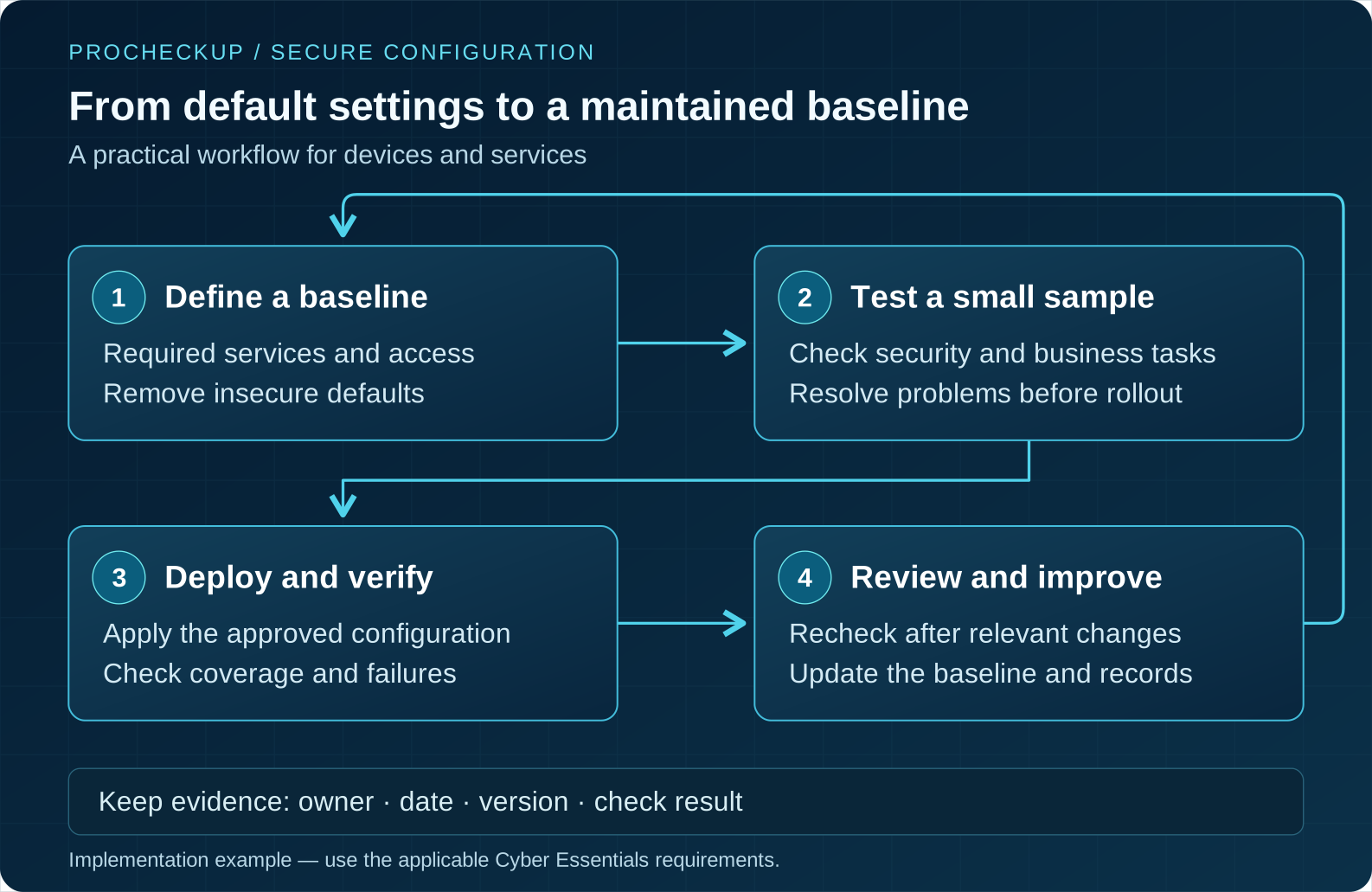
- Define a baseline: agree the settings needed for a device or service role and name the person responsible for changes.
- Test a small sample: check both security settings and normal business tasks. Correct problems before wider rollout.
- Deploy and verify: confirm the approved settings reached the intended devices. Investigate failures rather than treating a successful deployment job as proof of coverage.
- Review after change: recheck settings after software, role or service changes. Update the baseline and retain the version, owner, date and check result.
Example: test a revised laptop profile with a representative user, including sign-in, approved software and device locking. After rollout, compare effective settings with the profile and follow up any device that did not receive it.
3. User access control
Objective
Control who can use business data and services, and what they can do. Signing in successfully should not give someone more permissions than their role needs.
Introduction
An account identifies a user, but its permissions determine what that user can do. An ordinary employee and an administrator should not have the same access. Managing accounts throughout joining, role changes and leaving helps prevent unnecessary access remaining active.

Requirements
- Approve account creation and grant only the permissions needed for the person’s role, including accounts used by support suppliers.
- Authenticate each user with unique credentials before allowing access.
- Disable or remove accounts that are no longer required, and remove special privileges when the role no longer needs them.
- Use a separate administrator account for administration. Do not use it for routine browsing, email or everyday work.
- Enable MFA wherever it is available. Authentication to cloud services must use MFA under v3.3.
- For password-based access, apply the scheme’s password-quality and guessing-protection options. Support unique passwords and secure storage; do not impose routine expiry or complexity rules.
- Have a process to change passwords promptly when an account or password may have been compromised.
Requirements summary: NCSC v3.3, pages 18–22. See also IASME’s user access control explanation. Use the current scheme documents for all conditions.
Practical checks and evidence
Give each account a business owner and an appropriate role. Separate administration from everyday activity and remove access that is no longer needed. Test a joiner, a role change and a leaver, including cloud services. Confirm required MFA coverage and recovery methods, rather than assuming that buying MFA licences has protected every sign-in route.
- Record who approves new accounts and permissions. Remove unnecessary access when people leave or change roles.
- Use separate administrator accounts for administrative tasks. Everyday email and browsing should use ordinary accounts.
- Support unique credentials, suitable password storage and prompt changes when compromise is suspected. Confirm the required MFA settings on each relevant service.
Evidence example: compare an approved access request with the account’s actual role, then check the removal record for a leaver. IASME user-access guidance explains account and credential controls.
4. Malware protection
Objective
Prevent malicious software from causing harm. Malware includes ransomware, spyware and other unwanted programs; protection must suit the device and remain active.
Introduction
Malicious attachments, downloads or applications can steal information, disrupt work or encrypt files. Malware protection aims to stop harmful code running. The appropriate mechanism depends on the platform, and protection must cover the actual devices in use.
Requirements
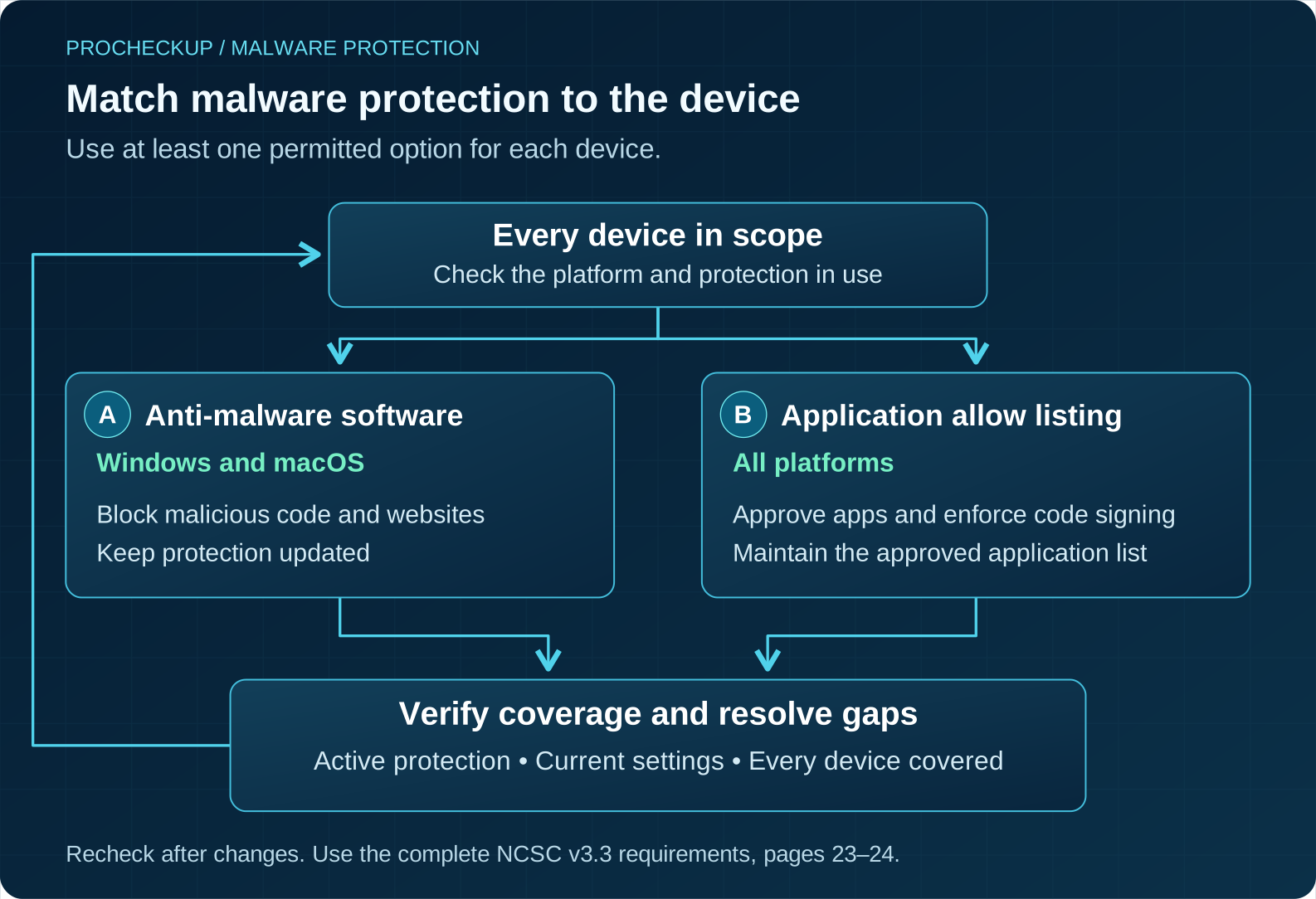
- Keep an active malware-protection mechanism on every in-scope device, using at least one of the options permitted by the scheme.
- For Windows and macOS, anti-malware software is one permitted option. Keep it updated as the vendor directs and configure it to stop malware, malicious code and connections to malicious websites.
- Application allow listing is an option for all in-scope devices. Approve applications before deployment, maintain the approved list and enforce code signing.
- With allow listing, users must not be able to install unsigned applications or applications with invalid signatures. An informal list of preferred apps is not enough.
- Make sure the selected protection remains active and correctly configured. Built-in protection may be used when it meets the requirements.
Requirements summary: NCSC v3.3, pages 23–24. See also IASME’s malware protection explanation. Use the current scheme documents for all conditions.
Practical checks and evidence
Choose a protection mechanism permitted for the device and platform under the scheme, and verify that it is active and maintained. Check coverage, update status, exclusions and who responds to alerts. Do not assume one desktop anti-malware product is the required or suitable approach for every platform. Restrict software installation and use approved application sources as part of the operating process.
- For an anti-malware approach, check that protection is running, receives updates and can detect and block malicious software.
- For application allow listing, approve applications before deployment, maintain the approved list and enforce code signing so unsigned or invalidly signed applications cannot be installed.
- Investigate devices missing from the protection report. Record exclusions and check whether they leave a requirement unmet.
Evidence example: a current device-coverage report, relevant policy settings and a record of how a protection failure was handled. IASME malware-protection guidance explains why desktop and mobile approaches differ.
Supporting defence: protect accounts as well as devices
Keep the account and endpoint controls working together. Restricting everyday privileges can limit the damage malicious software causes, while stronger authentication helps protect accounts from takeover. The following illustration shows complementary account defences; it is not a checklist of the malware-control requirements.

5. Security update management
Objective
Close known security weaknesses before attackers can exploit them. A security fix repairs a flaw; deploying it only helps when installation succeeds on the affected systems.
Introduction
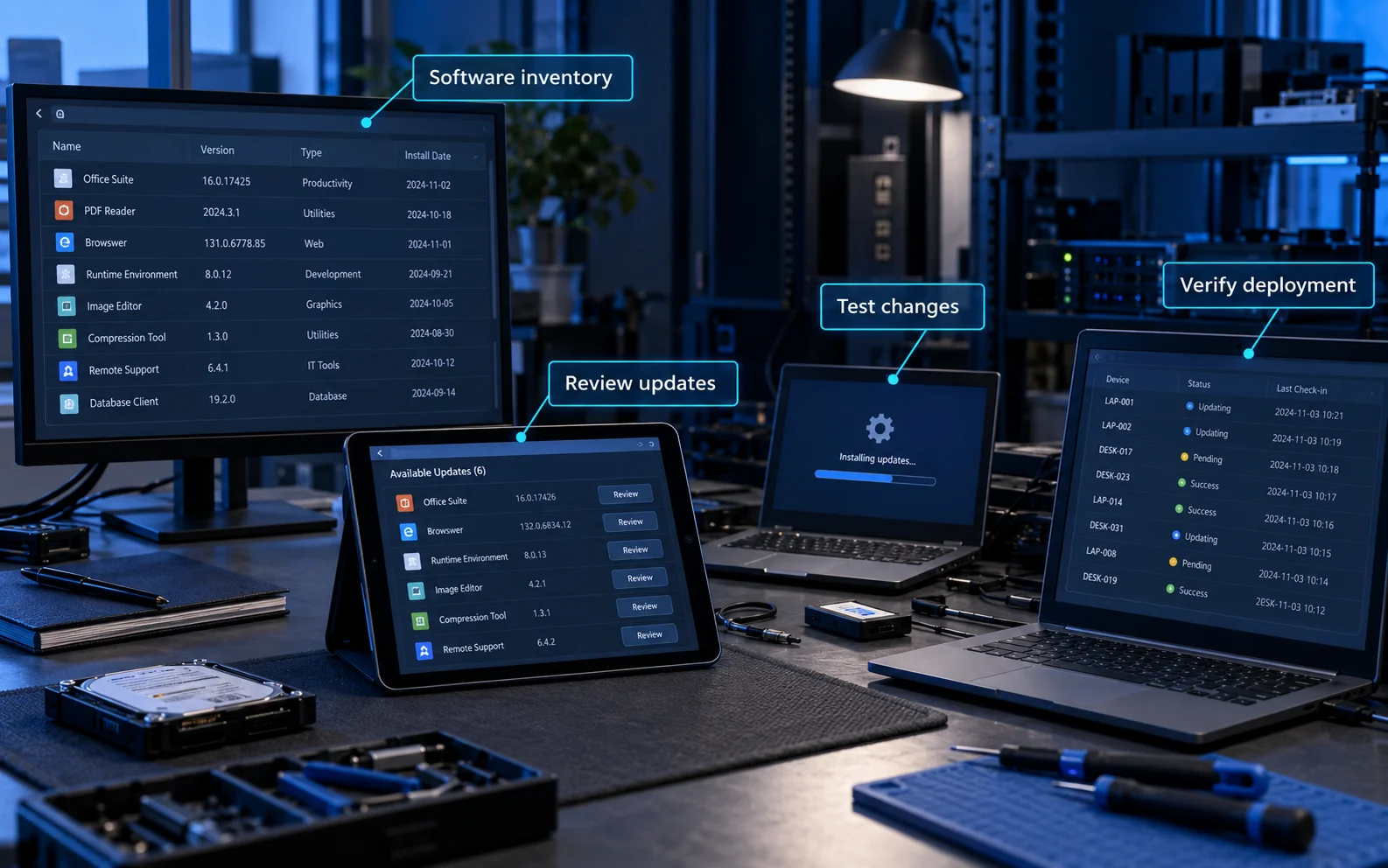
Software flaws can provide a route into otherwise well-managed systems. Vendors issue fixes while a product is supported, but scheduling an update does not prove it has installed. Track software and firmware versions, release dates and successful installation across the scope.
Requirements
- Use software that you are licensed to run and that continues to receive security fixes. Include operating systems, applications, browsers, extensions and relevant firmware.
- Enable automatic updates wherever possible and keep all in-scope software up to date.
- Install fixes within 14 days of the vendor’s release when the issue is rated critical or high risk, has a CVSS v3 base score of at least 7, or the vendor supplies no severity details.
- A combined update falls within that deadline if it fixes any vulnerability meeting those criteria.
- Remove unsupported software. The scheme also permits a defined, separately managed subset that prevents all traffic to and from the internet; agree any such scope arrangement with the Certification Body.
- Treat applying every update within 14 days as a recommendation, while observing the mandatory criteria above. An internal risk waiver does not replace a required fix.
Requirements summary: NCSC v3.3, pages 16–18. See also IASME’s security update management explanation. Use the current scheme documents for all conditions.
Practical checks and evidence
Maintain an inventory of supported versions, including applications, extensions and firmware where applicable. Assign an owner to review security updates, deploy them within the relevant deadline and investigate failures. Keep installation evidence and handle devices that have been offline. A pending update or an approved internal exception is not evidence that the scheme’s requirement has been met.
- Check operating systems, business applications, browsers, extensions and relevant firmware; one green operating-system dashboard is not the whole estate.
- Record the vendor’s release date, required deadline, affected devices and actual deployment result.
- Investigate failed installations, required restarts and devices that have not connected recently. Verify that the fix took effect.
- Confirm a legal right to use each software product as well as continuing security support. Enable automatic updates wherever possible, then check they actually install within the applicable deadline.
Evidence example: an update record that follows a released fix through deployment to confirmed installation. IASME update-management guidance covers software and firmware support.
Updates, cloud MFA and unsupported systems
Version 3.3 requires security updates within 14 days of release where the vendor describes the issue as critical or high risk, the vulnerability has a CVSS v3 base score of 7 or more, or the vendor provides no severity information. Applying all updates within that period is recommended, but should not be confused with the precise mandatory rule.
Plan for unsupported software before support ends. A policy accepting the risk does not by itself satisfy a scheme requirement. Discuss scope and remediation with the certification body; do not silently omit affected assets.
The v3.3 user-access requirements call for MFA where available and state that authentication to cloud services must use MFA. Check coverage across ordinary and privileged accounts, including services managed by an IT supplier. Test enrolment and recovery so the control is usable as well as enabled. Read the complete current requirements.
Current assessment emphasis: IASME’s April 2026 changes make missing available cloud MFA and failure to meet the specified high-risk or critical update deadlines automatic-fail issues. MFA being a paid option does not make it optional. These controls need to work across the scope, not just on a demonstration device. Read IASME’s 2026 assessment changes.
Common preparation gaps and how to resolve them
| Gap | Practical next action |
|---|---|
| The inventory omits an old laptop or a free cloud tool | Compare IT records with actual use. Assign an owner and establish whether the asset meets the controls. |
| MFA is enabled for administrators but not all required users | Check the service’s effective sign-in policy and coverage, including supplier-managed accounts and exceptions. |
| Updates are scheduled but installation is unverified | Check deployment results against the full inventory and resolve failures within the applicable deadline. |
| An unsupported application is labelled “accepted risk” | Plan supported replacement or a scheme-compliant scope solution with the Certification Body. An internal waiver is not a substitute. |
| A policy describes what should happen | Find evidence of what actually happened on the relevant users, devices and services. |
Prepare for assessment and maintain the result
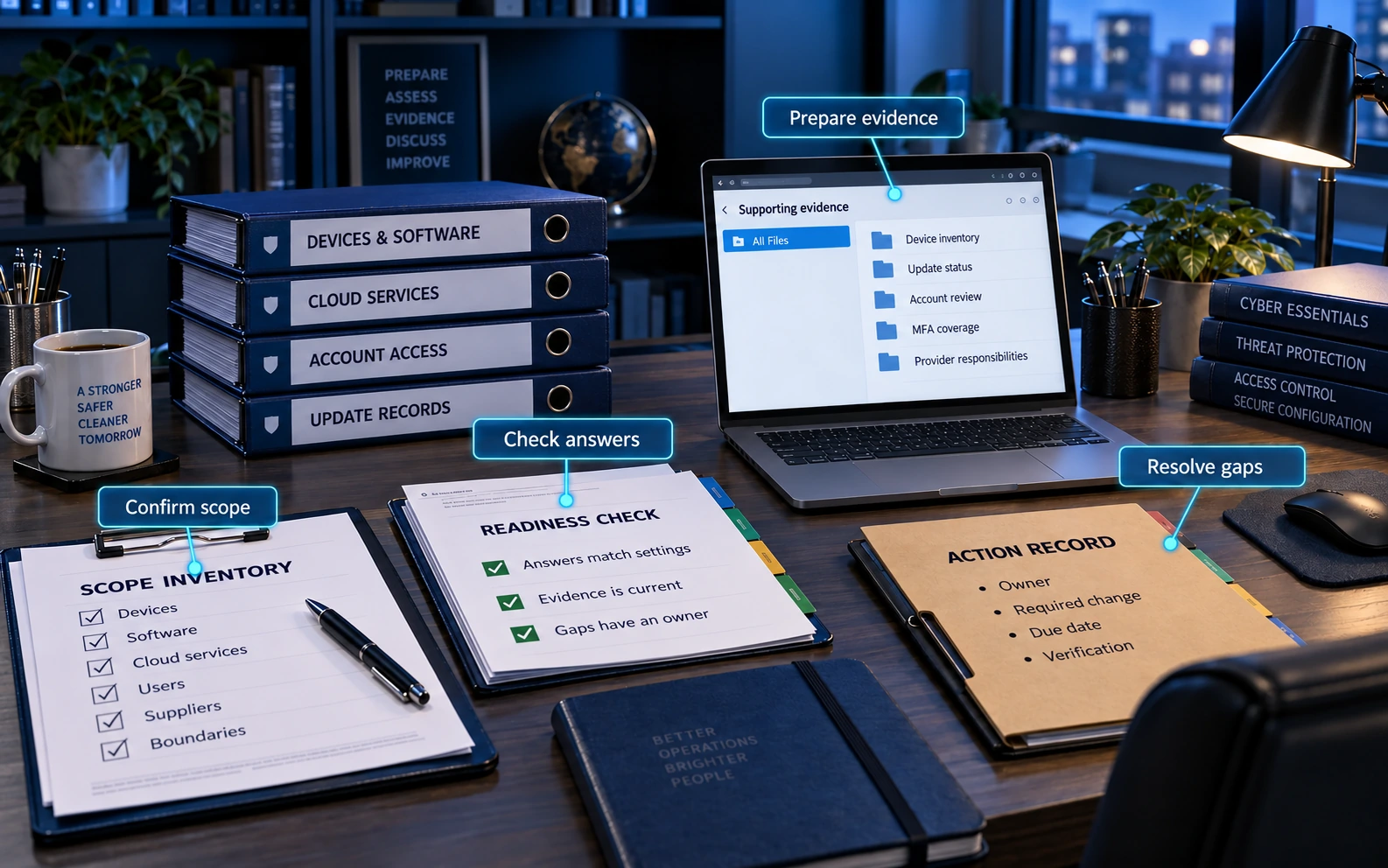
Where to start: name the business owner, map the devices and services people actually use, and ask IT to demonstrate the five controls. Use this guide to prepare questions and evidence; the scheme documents and your Certification Body determine the assessment requirements.
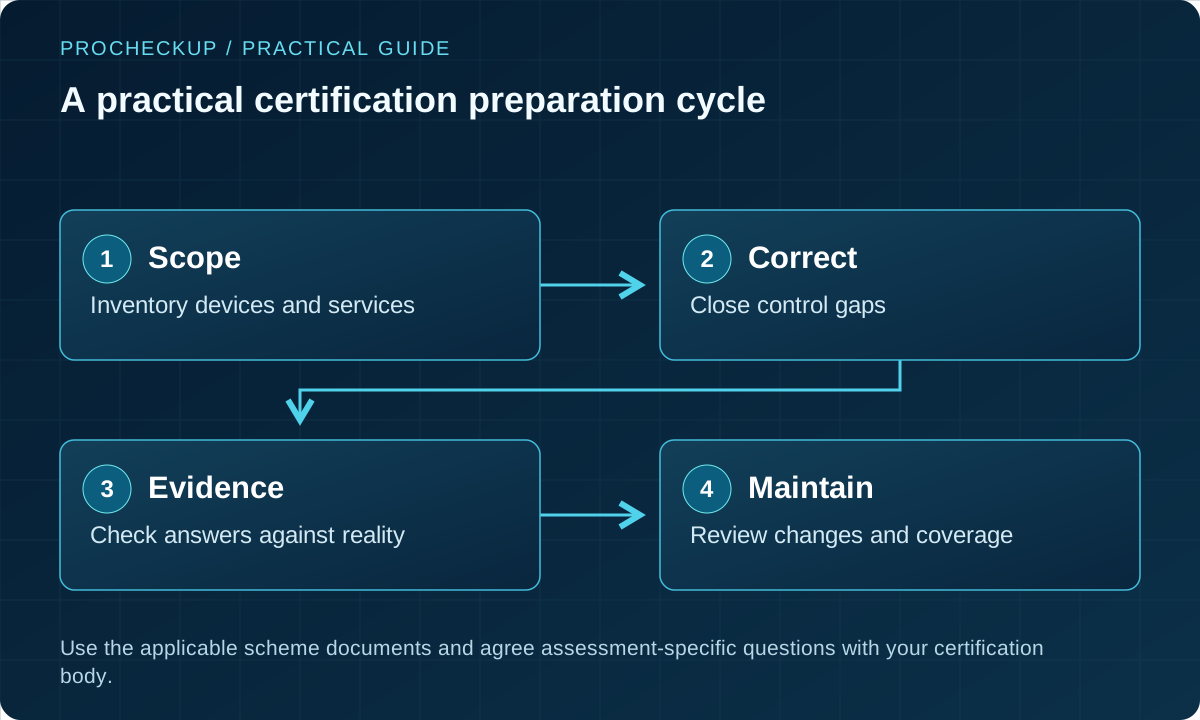
- Name an accountable internal owner, even if an IT provider performs most of the work.
- Inventory the scope and compare actual settings with the applicable requirements.
- Correct gaps and test representative users, devices and services.
- Check each answer against evidence before submission. Avoid copying last year’s answers unchanged.
- For Plus, prepare for the agreed independent technical verification and resolve findings through the scheme process.
- Maintain the controls between assessments; review new services, staff changes, upgrades and supplier changes.
Who assesses the application, and how do we submit it?
IASME is the NCSC’s delivery partner and licenses Certification Bodies. Use IASME’s current directory to check a provider and discuss the assessment level, scope and support you need.
- Prepare: download the applicable questions and requirements; draft answers against actual settings. The free Readiness Tool and Knowledge Hub can help identify gaps.
- Choose a route: use the self-led assessment or obtain paid help. Arrange Plus directly with a Certification Body.
- Submit: enter answers in the secure assessment platform. A senior person must confirm their accuracy before submission.
- Respond to review: an assessor checks the answers and may request clarification. Supply supporting records when requested and correct gaps through the assessment process.
- Communicate the result: once certified, share the correct level, scope and validity dates, and plan renewal.
IASME explains the certification routes and assessment platform. Keep evidence organised for checking and any assessor requests; do not assume every preparation document must be uploaded.
What happens during Cyber Essentials Plus?
Plus adds independent technical checks to the same five-control baseline. It is not a separate, broader security standard or a full penetration test. Agree the in-scope systems, assessor access, representative devices, test arrangements and any operational constraints before the audit. IASME describes the certification routes.
Plan the timing with your Certification Body. IASME’s FAQ allows the questionnaire stage to be reused where Cyber Essentials was achieved less than three months before Plus. Prepare early enough to resolve technical gaps. Check the current assessment and timing guidance.
The 2026 process requires update-management remediation across the scope. Following an initial sample failure, retesting includes the original and a new random sample; a second failure can lead to revocation of the verified self-assessment certificate. The self-assessment answers must be finalised before Plus testing and cannot be adjusted to match its results. See IASME’s Plus changes.
Preparation example: make the normal device and its management records available, explain any differences between device groups, and nominate someone who can investigate findings. Do not prepare a special compliant laptop while leaving the rest of that group unchanged.
Example: a small hybrid business
An illustrative business uses company laptops, personal phones for email, a cloud office suite and an outsourced IT provider. Its first task is to identify all devices and accounts accessing business information, including the phones and the provider’s administrative access.
The business records who configures the cloud suite, verifies MFA coverage, replaces unsupported software and checks update installation. It then tests a departing employee scenario to confirm access is removed. This produces evidence about the actual environment rather than a generic policy statement.
Backups, recovery exercises and staff training remain important. Backup is not one of the scheme’s five technical controls, so certification should not be treated as proof that recovery will work.
Prepare a useful assessment pack
- Agree the legal entity, scope description, devices, locations and cloud services with the certification body. Record any scope boundary clearly.
- Ask the IT provider for current inventory, support/version information, relevant settings and responsibility records. Obtain answers you understand rather than copying unexplained statements.
- Resolve gaps before attesting that a control is in place. For Plus, agree access, representative systems and arrangements for the independent technical checks.
- After assessment, keep owners and review triggers active when software, suppliers or working arrangements change. Confirm renewal and any contractual timing with the certification body.
Certification can support procurement and demonstrate a defined baseline. It does not guarantee uninterrupted operations or replace privacy work, recovery planning or deeper application testing. Any insurance benefit depends on the actual policy and eligibility; do not assume certification automatically reduces premiums.
Keep the pack practical: link each answer to its source, owner and date. A short evidence index is easier to maintain than a folder of unexplained screenshots. Keep sensitive configuration exports securely and share them only through the assessment’s agreed route.
| Record | Useful contents |
|---|---|
| Scope inventory | Legal entities, devices, software, cloud services, account ownership and justified boundaries. |
| Control evidence | Current settings, coverage reports, update results and account checks, with dates and responsible owners. |
| Gap record | The affected asset, required change, owner, due date and how completion will be verified. |
| Submission review | Answers checked against the environment and understood by the senior person signing the declaration. |
Keep the controls working after certification
Give changes a clear owner. Review the effect of a new application, cloud subscription, starter, leaver, supplier or working arrangement on the scope and controls. Check failed updates and protection alerts as part of normal operations, rather than waiting for renewal.
The 2026 declaration explicitly acknowledges responsibility for maintaining compliance during the certification period. IASME’s declaration update explains this commitment.
Broader resilience: keep backups, recovery exercises, staff awareness, incident planning and application security testing proportionate to your risks. They remain valuable even where they are outside the five technical controls. The certificate should not be described as proof of GDPR compliance, a complete security programme or guaranteed recovery.
Beyond the five controls: help people act safely
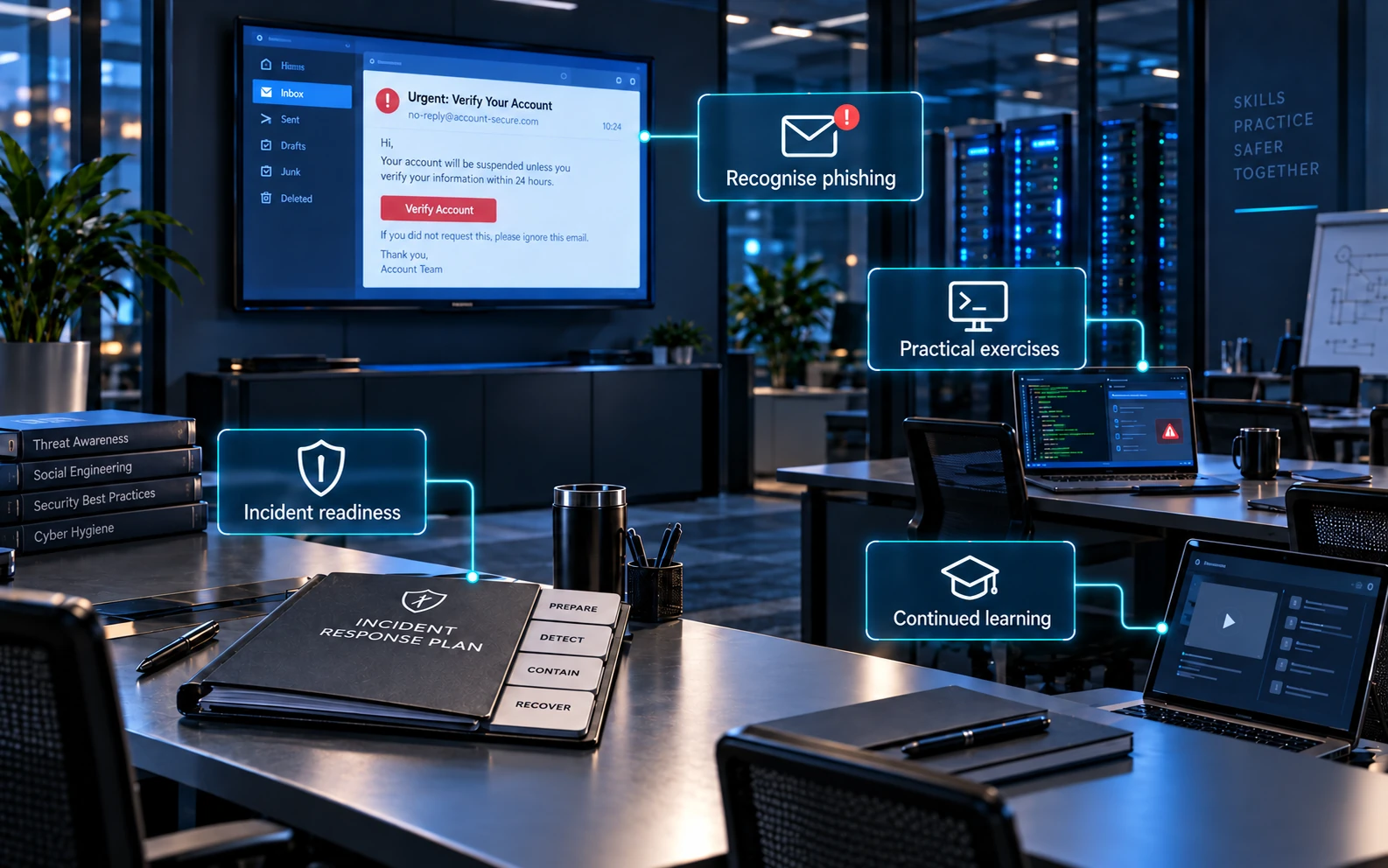
Staff awareness and incident preparation support the technical baseline; they are not additional Cyber Essentials technical controls. Keep the advice practical and make it easy to get help.
- Recognise and verify: practise checking unexpected payment, sign-in or software-installation requests through a trusted channel. Do not rely on how convincing a message looks.
- Use approved software: explain where to obtain applications and how to request a new tool, rather than asking people to bypass protection or install an unverified download.
- Report promptly: give everyone a clear contact for suspicious messages, unexpected MFA prompts, lost devices and possible mistakes. Encourage early reporting without blame.
- Rehearse and improve: walk through a realistic scenario, check who can respond when the usual contact is unavailable, and update guidance after incidents or changes.
The NCSC’s advice on spotting cyber attacks supports independent verification and response planning. See our phishing guide for more examples.
Is Cyber Essentials worth having?
Its value comes from implementing the controls and demonstrating the result for a defined scope. For a small organisation, the five areas give the IT owner a manageable starting point; for a buyer, certification is one piece of supplier assurance.
- Reduce common exposure: prioritise basic weaknesses such as unnecessary internet access, unsupported software and excessive account permissions.
- Meet purchasing requirements: some customers require Cyber Essentials or Plus. Check the tender wording, required level, scope and deadline before commissioning an assessment.
- Support customer confidence: share accurate certification details and explain how the controls are maintained. A badge alone does not show whether a particular service is covered.
The NCSC’s scheme overview describes the common-threat, procurement and trust benefits. Certification does not guarantee contract awards, uninterrupted operations or protection against every attack.
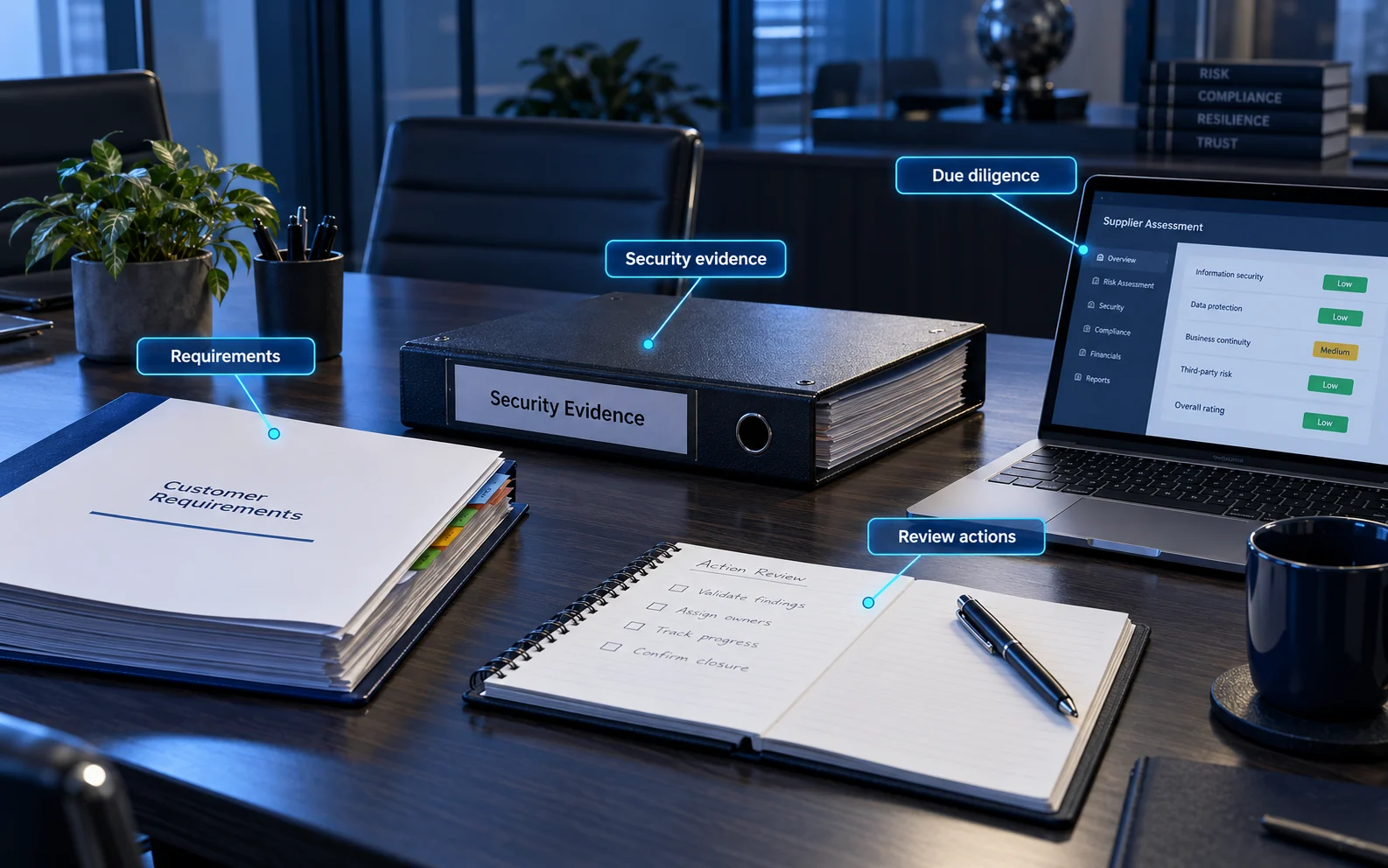
When checking a supplier: verify the organisation, certificate level and validity using IASME’s certificate search, then request the certificate’s scope and confirm it covers the service you will use. Assess other requirements, such as recovery arrangements and handling of sensitive information, separately. Record unresolved questions and an owner for each follow-up.
Common questions
Should we choose Cyber Essentials or Plus?
Consider customer requirements and the assurance you need. Plus adds technical verification to the same baseline controls. Confirm eligibility, scope and the assessment process with your certification body.
Does our cloud provider’s certificate cover us?
Not automatically. Your scope, accounts, configuration and shared responsibilities still need to be addressed.
Is certification enough for all contracts or regulation?
No. It may meet a particular procurement condition, but other obligations and risks can require additional controls and assurance.
What does Cyber Essentials cost?
At this review, IASME lists verified self-assessment fees of £320, £440, £500 or £600 plus VAT for organisations with 0–9, 10–49, 50–249 or 250+ employees respectively. Preparation, remediation and support can add to the cost; Plus is quoted separately according to the environment. Check current IASME pricing.
How long does it take, and when do we renew?
Preparation depends on the gaps in your environment. IASME allows six months from application to complete the assessment. Certificates expire after 12 months, so plan renewal ahead of expiry and review the current questions each time. IASME timing and renewal FAQ.
Can a small business without an IT team achieve it?
Yes. Start with the free question set and readiness resources, then obtain help for unfamiliar settings or scope decisions. Your IT supplier can provide technical answers, but the organisation should understand and check what it submits. Start with the preparation questions.
Does certification automatically reduce insurance premiums?
No premium reduction should be assumed. IASME offers an associated cyber-insurance benefit for eligible applicants; eligibility, scope, policy terms and cover must be checked separately. The NCSC overview links to the insurance information.
Related guidance
Authentication and account recovery · Configuration and build reviews · A broader maturity assessment
Need Help?

If you have any questions about cyber security or would like a free consultation, don't hesitate to give us a call!
For More Information Please Contact Us
ACCREDITATIONS