What is cyber security?
Cyber security is the management of risks to digital systems, information and the services that depend on them. It combines people, processes and technology to reduce the likelihood and impact of unauthorised access, disruption, misuse or loss.
For a business, the useful starting point is what needs to keep working: customer communications, payments, records, production or care. Identify the systems, people and suppliers supporting those activities, then decide which risks require attention first.
If you suspect an active compromise, go straight to the incident-response guidance below. Otherwise, begin with the systems and accounts whose loss would stop the business or expose sensitive information.
A useful outcome: a short improvement plan that names your critical services, the risks that matter most, the actions needed, their owners and how you will verify completion. Begin with manageable steps, then build depth where the risks justify it.
Content reviewed: 26 October 2026.
What are we protecting?
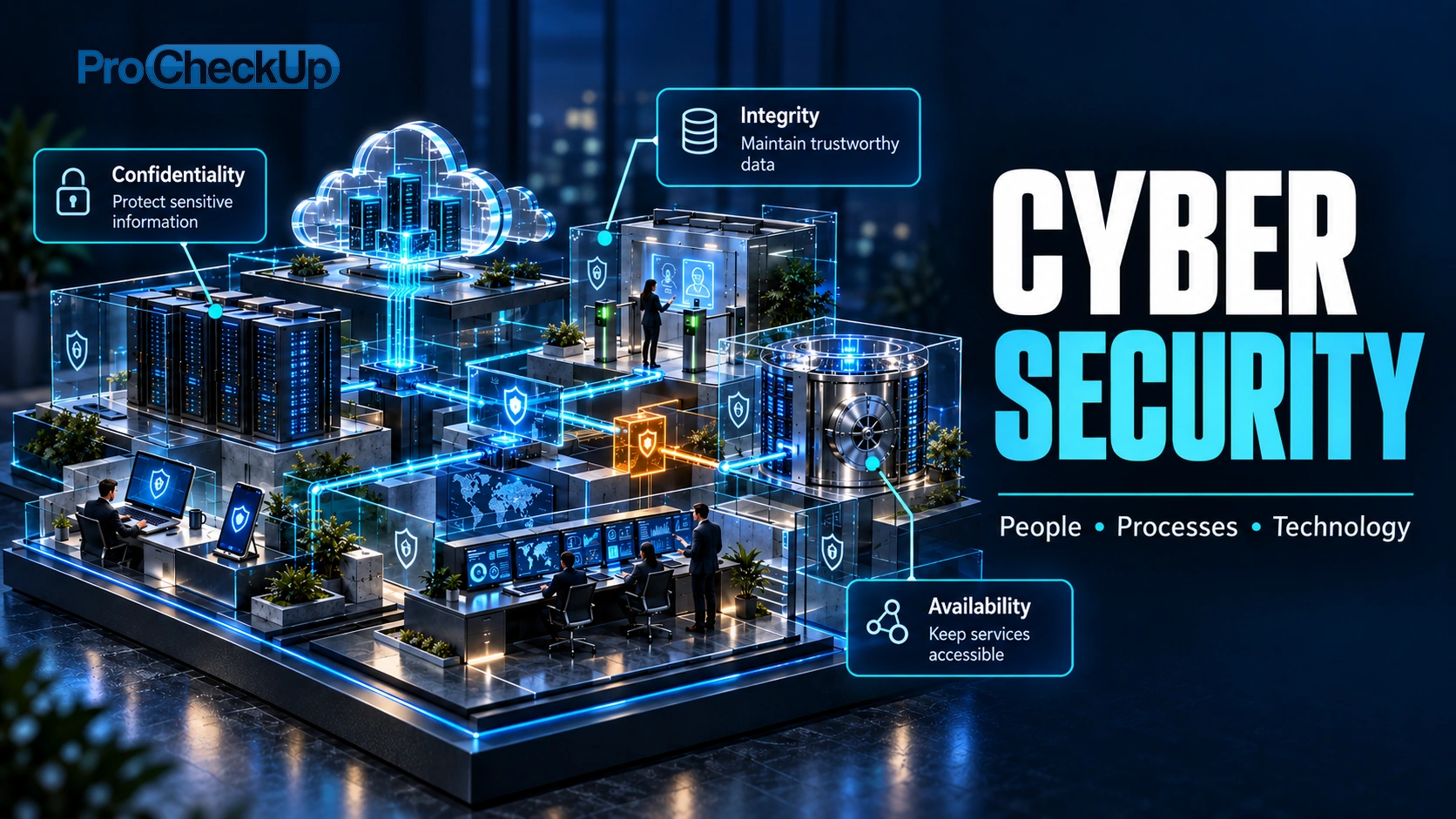
| Objective | Business example |
|---|---|
| Confidentiality | Only authorised people can access a customer record. |
| Integrity | An invoice or payment instruction cannot be altered without authorisation. |
| Availability | Staff can use an important service when it is needed. |
These objectives often overlap. A stolen account could expose records, change details and disrupt access. Security decisions need to consider business consequences, not just whether a device has a security product installed.
What commonly goes wrong?
- Account compromise: stolen credentials, insecure recovery processes or abused sessions provide access.
- Phishing and impersonation: convincing messages or calls persuade someone to disclose information or approve an action.
- Exposed weaknesses: vulnerable software, insecure settings and excessive permissions create opportunities for misuse.
- Ransomware and data theft: an intrusion may affect confidentiality as well as the ability to operate.
- Supplier or service failure: a dependency can interrupt your business even when your own systems are functioning.
Accidental changes, lost devices and mistakes can also cause harm. Assess credible scenarios and their impact rather than assuming every organisation faces the same priorities.
Where should a small organisation start?
The NCSC small organisations guide provides a practical UK starting point. Turn the basics into owned, repeatable tasks.
A practical first pass: assign a business owner, list critical services and contacts, secure email and administrator access, review exposed or unsupported systems, and demonstrate a restore of important data. Record gaps with an owner and due date. This is a starting checklist, not a complete security assessment.
Protect accounts and access
Prioritise email, remote access and administrative accounts. Use unique passwords stored in a reputable password manager, enable multi-factor authentication (MFA) and consider passkeys where supported. Check recovery arrangements, remove unused access and separate everyday work from privileged administration. See the NCSC account-security guidance.
Maintain devices and services
Keep an inventory of important systems and cloud services. Apply security updates, replace unsupported software and review exposed services and default settings. Ensure someone owns these tasks, including work performed by suppliers.
Protect backups and test recovery
Decide how much data the business can afford to lose and how quickly each service must return. Maintain protected backup copies, restrict who can alter or delete them and test restoration. Check the credentials, software and supplier support needed for recovery. A synchronised folder can replicate deletion or damage; verify what independent recovery and retention your service actually provides. See the NCSC backup guidance.
Make reporting and verification easy
Give staff a clear way to report suspicious messages and mistakes. Verify payment changes and sensitive requests using an independently established contact route. Practise escalation so people know who can authorise urgent decisions.
How do everyday technical protections work together?
| Protection | What it helps with — and what else matters |
|---|---|
| Network restrictions and firewalls | Limit which systems and services can communicate. Review exposed administration and supplier access. A permitted connection can still carry misuse, so application permissions and monitoring remain necessary. |
| Encryption and secure connections | Protect information against relevant risks in transit and storage. HTTPS helps prevent interception or alteration in transit when certificate validation works; it does not prove that a website or recipient is trustworthy. Keep certificate warnings meaningful and protect devices and recovery keys. |
| Malware protection and supported software | Help prevent or detect harmful programs. Keep protection working and updates applied, and review alerts. These controls do not replace secure accounts, restricted privileges or tested recovery. |
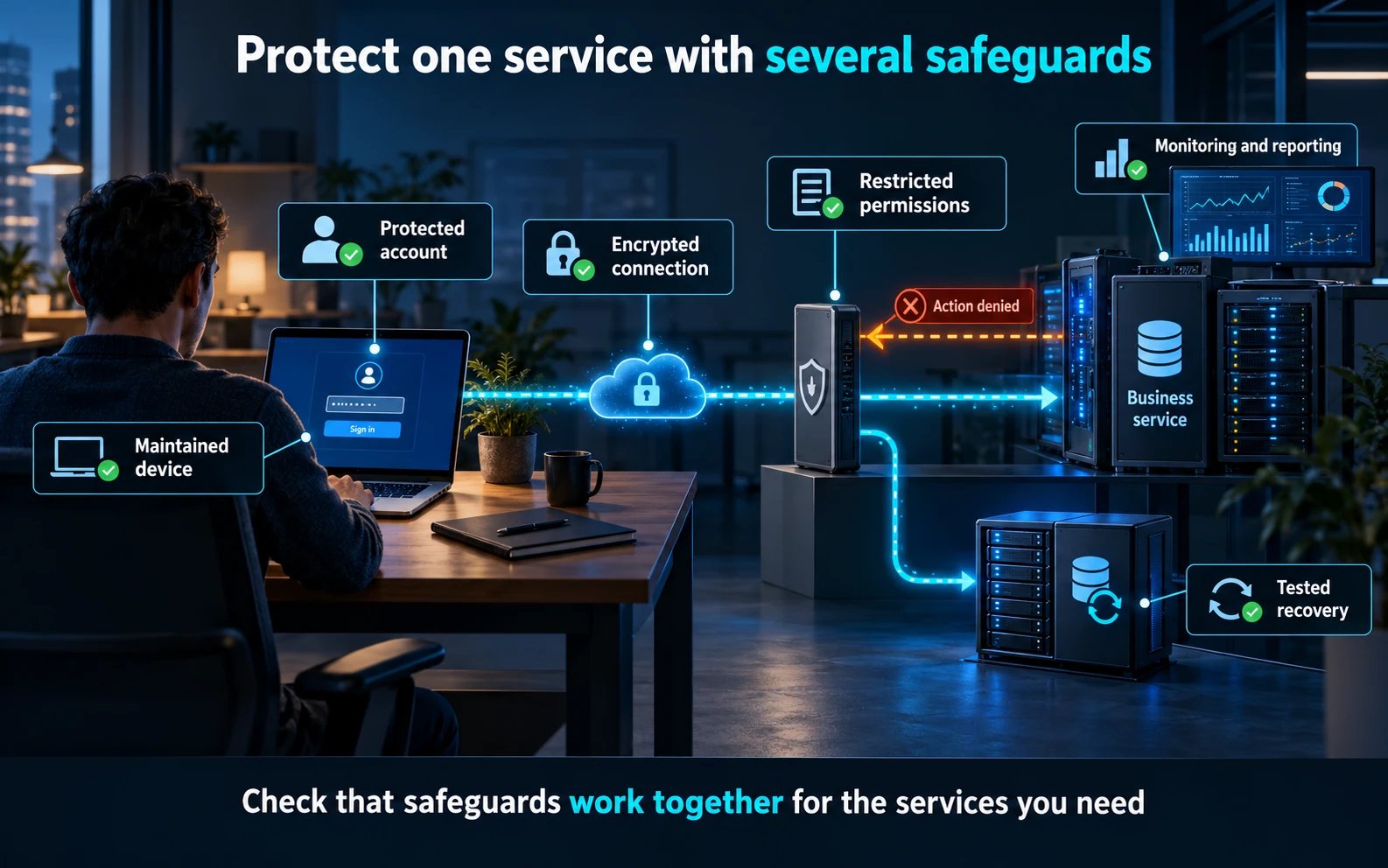
An on-path attack attempts to intercept or change communications between parties. Secure protocols reduce that opportunity, but the endpoints, certificate trust and account access still need protection. For example, encrypting a laptop helps protect stored files if it is lost; it does not stop a signed-in account from sharing those files with the wrong recipient.
Select and check controls together against a business scenario. For a remote worker, this may mean a managed device, protected account, restricted access, secure communications and a clear lost-device reporting route. See NCSC’s small-organisations guide for a practical starting point.
How can we turn the basics into a practical plan?
The following first-month outline is a planning example for a small organisation. Adapt the order and timescale to your risks and resources; urgent exposures and active incidents need attention immediately. It is not a certification checklist.
| Stage | Action and evidence of progress |
|---|---|
| Establish the starting point | Name the responsible leader. List critical services, sensitive information, suppliers and emergency contacts. Record known gaps rather than assuming the inventory is complete. |
| Secure common entry points | Review email and administrator access, MFA coverage, recovery settings, exposed services and unsupported systems. Assign owners and priorities to the gaps found. |
| Prove recovery | Select a representative service and test restoring usable information with the required accounts, software and supplier support. Record the result against the recovery need agreed with the business. |
| Practise and review | Walk through a realistic suspicious-payment or account-compromise scenario. Check decisions and contacts, record lessons and approve the next set of improvements. |
Example: a small professional-services firm depends on cloud email, shared files and invoicing. Its first priorities might include protecting email administration, independently verifying bank-detail changes, checking supplier access and proving file recovery. Buying another security product would not by itself demonstrate that those business risks are controlled.
Give every action an owner, due date and completion check. “Enable MFA” becomes “confirm MFA covers the relevant email administrators, review exceptions and test recovery arrangements”. “Improve backups” becomes “restore the selected information successfully and resolve the gaps found”.
What do monitoring and threat intelligence add?
Monitoring helps establish what happened and when action is needed. Begin with a few questions about critical services: who changed an administrator account, whether important files were exported, or whether backup protection was disabled. Identify the records needed to answer them and check that authorised responders can retrieve those records during an incident. NCSC’s logging guidance explains this approach.
Agree who checks alerts, the hours covered and how urgent issues are escalated. Protect log access, retain useful records for an appropriate period and avoid collecting unnecessary sensitive information. Test the route with an agreed event. Buying a monitoring product does not establish that someone will investigate its alerts.
Threat intelligence is information assessed for its relevance to your risks. A supplier warning about a flaw in software you actually run is actionable: identify affected systems, assess exposure, apply or plan the fix and check the result. An indicator of compromise, such as a known malicious file identifier or destination, is a clue to investigate; one match is not always conclusive, and no match does not prove there was no compromise.
Automation can collect evidence and route alerts. Actions that disable accounts or isolate systems need tested rules, appropriate authority and a way to handle errors, especially where interruption could affect care, production or safety.
The six functions of NIST CSF 2.0
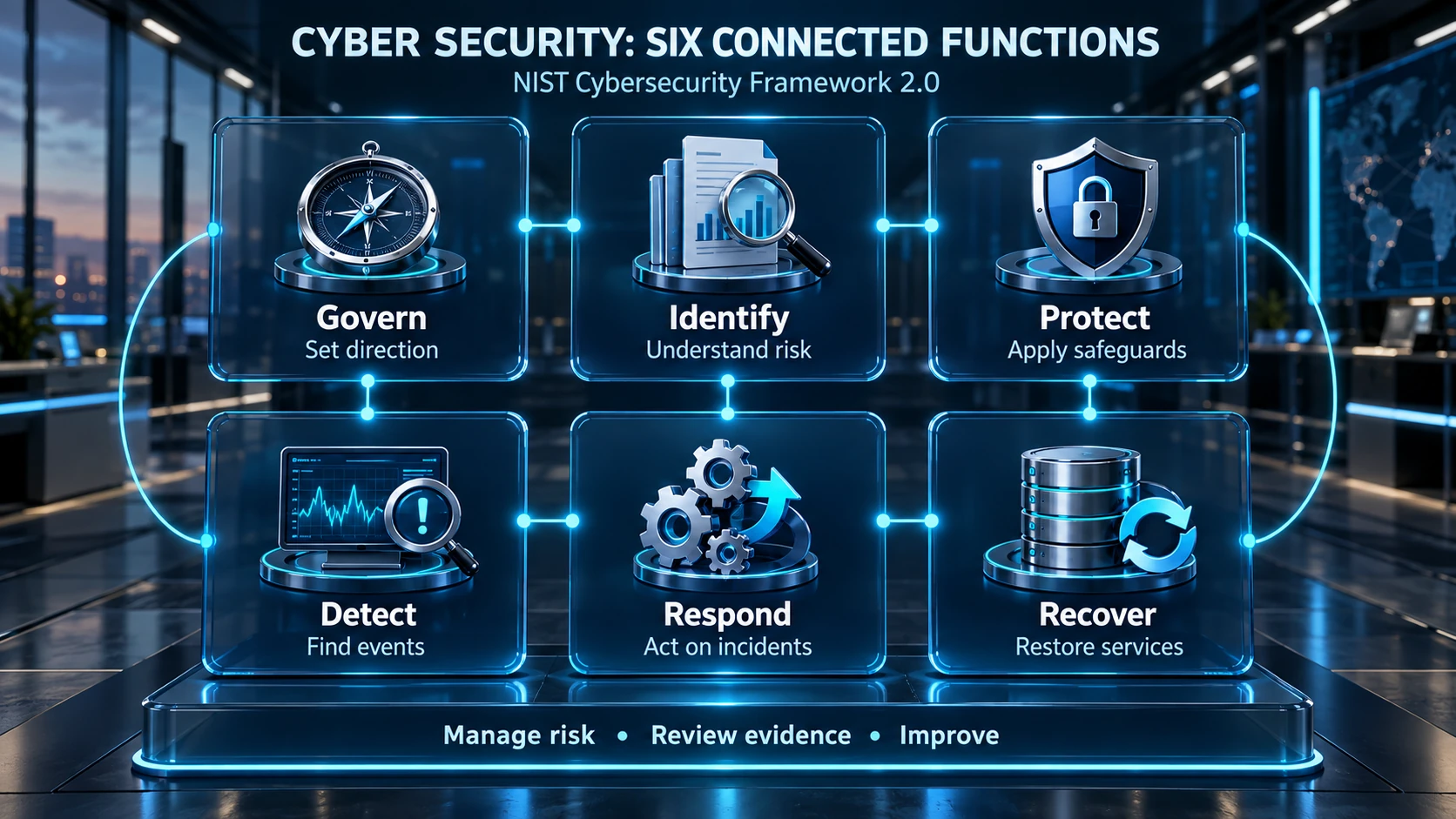
The NIST Cybersecurity Framework 2.0 organises cyber-risk outcomes into six connected functions. They support ongoing management rather than a rigid sequence or a product shopping list.
| Function | Practical question |
|---|---|
| Govern | Who sets priorities, assigns responsibilities and oversees risk? |
| Identify | Which assets, dependencies and risks do we need to understand? |
| Protect | Which safeguards reduce the likelihood or impact of harm? |
| Detect | How will we recognise events that may require action? |
| Respond | How will we manage and contain a detected incident? |
| Recover | How will we restore affected services and learn from the event? |
Governance informs the other functions. An organisation can compare its current and desired outcomes, identify gaps and assign improvement owners. Framework use does not itself certify security or prove every control is effective.
NIST does not certify organisations or products against the CSF. Use a Current Profile and Target Profile to describe the outcomes you have and need, then prioritise the gaps. Avoid presenting a framework diagram or a self-assigned score as independent assurance.
How is security different from compliance?
Security manages risk to the organisation and its stakeholders. Compliance concerns particular legal, contractual or scheme requirements. They overlap, but satisfying one requirement does not automatically address every important risk.
Cyber Essentials focuses on a defined technical baseline. ISO 27001 concerns an ISMS. PCI DSS addresses payment account data. Establish which obligations apply to your activities and scope; do not treat these as interchangeable certificates.
Which assessment would help?
| Question you need answered | Useful starting point |
|---|---|
| Where are our wider capability gaps? | A cyber maturity assessment with evidence and an improvement roadmap. |
| Could an attacker exploit this application or environment? | A scoped penetration test. |
| Are these systems configured appropriately? | A build or configuration review against an agreed baseline. |
| Would we detect and respond to an agreed attack scenario? | An appropriate red or purple team exercise, depending on readiness and objectives. |
A vulnerability scan can support discovery and prioritisation, but does not replace all of these assessments. Select the work around the decision you need to make, then agree scope, limitations and how findings will be acted on.
Practical business questions
Review security from the perspectives of management, people, technology, suppliers and recovery. A control that appears effective to one team may still depend on a decision or task nobody owns.
Who should own cyber security?
A named senior leader should own business risk and priorities, supported by IT, security, operational teams and suppliers. Assign responsibility for each recurring control and for urgent decisions. Outsourcing IT does not remove the need to agree responsibilities, check evidence and maintain an incident contact route.
Are cloud services automatically secure?
No. Check who manages accounts, permissions, devices, configuration, monitoring, backup and recovery in each service. Ask providers what is included and what remains your responsibility. Test the recovery arrangements you rely on rather than assuming the provider will restore everything your business needs.
Are antivirus, a firewall and staff training enough?
They can help, but they do not cover all risks. Stolen sessions, overprivileged accounts, unpatched internet-facing systems and poorly tested recovery can still cause serious harm. Combine suitable controls and verify that they operate effectively. Select tools around identified gaps rather than treating a product bundle as proof of protection.
How should we prioritise a limited budget?
Start with the services, data and accounts that matter most, then address likely routes to serious harm and gaps in recovery. Compare the cost and effort of improvements with the risk they reduce. Track useful evidence: protected critical accounts, resolved high-priority exposures, successful restore tests and exercised response contacts. No fixed percentage or universal tool list suits every organisation.
Use a small set of measures that supports decisions: critical accounts with effective protection, unresolved high-priority exposures and their age, restore-test results, and actions closed after exercises. Review the underlying evidence and exceptions; a high headline percentage can hide an unprotected critical system.
What if we suspect an incident?
- Escalate promptly. Contact the responsible response team or provider using a trusted route; use an alternative channel if normal communications may be compromised.
- Record and preserve. Note what was observed, when and on which systems. Coordinate containment and evidence preservation; avoid unplanned wiping or rebuilding.
- Assess business and data impact. Identify affected services, sensitive information, suppliers and people. Assign someone to coordinate decisions and communications.
- Assess notifications early. Do not wait for a complete forensic investigation before checking legal, contractual and sector reporting duties.
For a UK GDPR notifiable personal-data breach, the ICO says controllers must report without undue delay and within 72 hours of becoming aware. Not every cyber incident meets that threshold; document the assessment. Processors must inform the controller without undue delay, and high risk to individuals can require notifying them too. See the ICO breach guidance.
Use the NCSC response guidance for small organisations for practical public advice, or contact ProCheckUp incident response services for organisational support.
Further reading and support
Explore the phishing guide, authentication guide and cyber maturity assessment guide. For scope, delivery and enquiries, visit security assessment services or contact ProCheckUp.
Maintain a short improvement plan with owners, dates and evidence of completion. Review it when the business, systems or suppliers change, and check that the improvements work in practice.
Need Help?

If you have any questions about cyber security or would like a free consultation, don't hesitate to give us a call!
For More Information Please Contact Us
ACCREDITATIONS