

Introduction
A single credential committed to a source-code repository can become the starting point for a much wider cloud compromise.
In a recent ProCheckUp credential-discovery engagement for a major international organisation, an assessment that began with Azure secret discovery uncovered evidence of a potentially long-running compromise within a separate AWS environment.
The investigation identified:
- A long-lived AWS root-user access key committed to a source-code repository.
- Evidence that the exposed credential remained active long after its original exposure.
- Multiple unfamiliar IAM users with highly privileged access.
- Administrative accounts created shortly after the apparent credential exposure.
- Later reconnaissance activity affecting identity, regional, contact and billing-related services.
- An additional active access key that had not appeared in the original repository findings.
The case demonstrates why secret discovery should not stop when a suspicious string is found. Organisations need to establish what the credential belongs to, whether it remains usable, where else it appears and whether the surrounding cloud environment shows evidence of persistence or unauthorised activity.
How the Exposure Began
The investigation traced the initial risk to a CSV file committed to a source-code repository during 2024. The filename explicitly indicated that it contained an AWS root-user credential.
Files generated for cloud credentials commonly contain an access-key ID and a corresponding secret access key. Once both values are present, anyone who obtains the file may be able to make authenticated API requests using the permissions assigned to that identity.
In this case, the exposed credential belonged to the AWS account root user. This represented the most serious form of AWS credential exposure because the root user has unrestricted access to the account and its resources.
AWS strongly recommends that organisations do not create root-user access keys. Everyday programmatic access should instead use temporary credentials, IAM roles, IAM Identity Center or tightly restricted identities operating under least privilege.
What ProCheckUp Found
ProCheckUp’s investigation combined source-code credential discovery, contextual correlation and controlled validation. The objective was not merely to identify values that resembled secrets, but to determine whether selected findings represented genuine and current security risks.
The assessment established that:
- The root-user credential appeared in repository content dating from 2024.
- A controlled AWS identity request confirmed that the credential was still accepted when tested during the authorised assessment.
- The credential authenticated as the root identity of an AWS account.
- Several unfamiliar IAM users existed within the account.
- Multiple unfamiliar identities had administrator-level permissions.
- Some privileged identities had been created shortly after the apparent repository exposure.
- A separate active access key was identified in the AWS environment even though it had not been found in the scanned repository material.
- Cloud activity indicated later reconnaissance involving account, identity, region, contact and billing-related information.
The temporal relationship (use in hours/days) between the repository exposure and the creation of unfamiliar privileged identities was highly concerning. However, timestamps alone do not conclusively attribute those changes to a particular actor. Definitive attribution would require complete audit records, source-IP analysis, identity history and evidence from AWS or other relevant service providers.
A Likely Attack Path
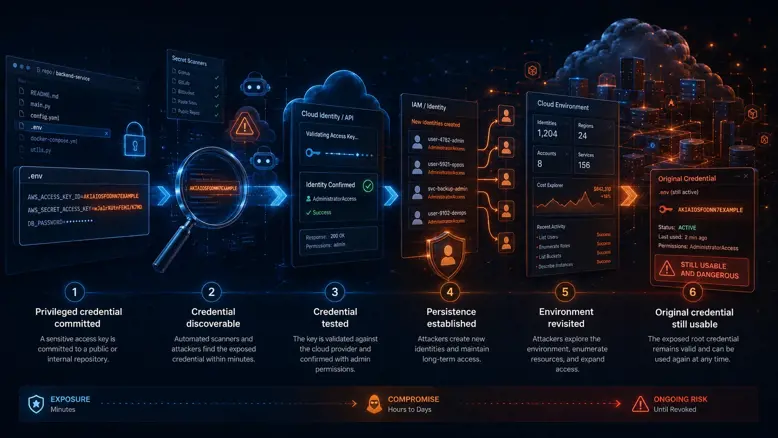
The available evidence supported the following likely sequence of events.
1. A privileged credential was committed
A developer or administrator committed a clearly labelled credential file to a source-code repository. The repository may have been believed to be private, restricted or otherwise safe from external discovery.
2. The credential became discoverable
Attackers and automated services routinely search source-code platforms for access keys, tokens, passwords and private keys. Publicly exposed cloud credentials can be discovered and tested within minutes, leaving little practical time for manual review or conventional incident escalation.
3. The credential was tested
Once both components of the AWS credential were available, an unauthorised party could determine whether the key was valid by submitting a signed identity request or calling another low-impact AWS API.
4. Persistence may have been established
Several unfamiliar IAM identities were created after the apparent exposure, including accounts with broad administrative permissions. Creating separate identities would allow continued access even if the originally exposed key were later disabled.
5. The environment was revisited
Later activity indicated account reconnaissance, including identity enumeration and requests involving regional, contact and cost information. This pattern was consistent with an actor seeking to understand the available environment, permissions and opportunities for further activity.
6. The original credential remained usable
During the authorised engagement, ProCheckUp confirmed that the root credential was still accepted. This meant that removing the file from the current branch—or merely making the repository private—would not have resolved the underlying risk.
Why the Filename Mattered
The exposed file was not hidden behind an obscure name. Its filename clearly indicated that it contained a root-user credential.
Automated discovery tools commonly prioritise filenames and content associated with secrets, including:
- *rootkey*
- *credentials*
- *access_keys*
- .env
- secrets.json
- credentials.csv
- appsettings*.json
- local.settings.json
They also search for recognisable credential structures, high-entropy values and key names such as secret_access_key, client_secret, password and account_key.
A clearly labelled file containing a recognised cloud-access-key format provides both the credential and the context required to prioritise it. From an attacker’s perspective, very little interpretation is necessary.
Why It Remained Undetected
The investigation highlighted several control gaps that can allow repository credential exposure to develop into a long-running cloud-security incident.
Insufficient secret prevention
- The credential reached the repository instead of being blocked before or during the push.
- No effective control prevented a root-user credential file from entering source control.
- The exposed key was not immediately and automatically revoked.
Limited identity review
- Unfamiliar privileged IAM identities remained present for an extended period.
- Administrator-level permissions were not reconciled against an approved identity inventory.
- Access keys and their last-used activity were not subject to sufficiently effective review.
Insufficient monitoring
- Unusual identity, regional and account-reconnaissance activity was not escalated early enough.
- CloudTrail data alone was not sufficient without alerting, investigation and an accountable response process.
- The organisation lacked effective detection for unexpected use of long-lived privileged credentials.
Incomplete remediation
- Deleting a file from the current version of a repository would not remove it from Git history.
- Removing the exposed file would not revoke the AWS credential.
- Rotating only the original key would not remove persistence created through additional IAM users, roles or access keys.
What Could Be Proven
Credential investigations must distinguish confirmed facts from reasonable but unproven conclusions.
The assessment confirmed:
- A root-user access key had been committed to source control.
- The credential was accepted during controlled validation.
- The identity resolved to an AWS account root user.
- Unfamiliar IAM users and administrative permissions existed.
- An additional active access key existed outside the repository findings.
- Relevant cloud reconnaissance activity had occurred.
The available evidence did not, by itself, conclusively determine:
- Who originally obtained or used the exposed credential.
- Whether every unfamiliar IAM identity was created by the same actor.
- Whether sensitive business data had been accessed or exfiltrated.
- Whether infrastructure had previously been created and later deleted.
- Whether email, storage, compute or other AWS services had been abused historically.
- Whether the exposure was connected to any separately reported security incident.
Some services returned responses indicating that they were not enabled in the tested account or region. This reduced concern about those specific services at the time of testing, but it did not prove that they had never been enabled or abused previously.
A definitive conclusion would require complete CloudTrail history, AWS Config records, billing and cost data, service-specific logs, identity history and—where normal retention periods had elapsed—assistance from AWS Support.
Why Secret Scanning Alone Is Not Enough

Secret scanning is an essential preventive and detective control. GitHub Secret Protection can inspect repository history, detect supported credentials and custom patterns, perform validity checks for certain secret types and help block secrets before they are pushed.
However, a secret-scanning alert does not always answer the wider incident questions:
- Does the value represent a complete credential or only one component?
- Does it still authenticate?
- Which account, tenant, subscription or service does it belong to?
- Where else does the same credential appear?
- Was another persistent identity created using the original credential?
- What activity occurred after the exposure?
- Which logs and accounts require immediate investigation?
- Has remediation removed the credential from both the provider and repository history?
This is where expert credential discovery and controlled validation add value. The objective is to turn a large set of potential findings into a defensible account of genuine exposure and remediation priority.
Immediate Response Actions
When an active privileged cloud credential is discovered in source control, organisations should treat it as an incident rather than an ordinary code-quality issue.
Within the first hours:
- 1. Disable or rotate the exposed credential through a controlled emergency process.
- 2. Secure the root user, change its password where appropriate and enforce phishing-resistant MFA.
- 3. Preserve relevant CloudTrail, identity, billing, configuration and repository evidence.
- 4. Inventory all IAM users, roles, policies, access keys and trust relationships.
- 5. Investigate unfamiliar identities and administrative policy attachments.
- 6. Review activity from unexpected IP addresses, regions, user agents and time periods.
- 7. Check for newly created keys, roles, federation providers and cross-account access.
- 8. Review cloud expenditure and service usage across every enabled region.
- 9. Escalate to the cloud provider if historical records or additional investigation support are required.
Revocation should generally occur before Git-history rewriting. Removing a secret from source control does not invalidate it, whereas provider-side revocation immediately removes its future usefulness.
Long-Term Preventive Controls
Eliminate root-user access keys
- Do not create programmatic access keys for AWS root users.
- Protect root-console access with strong, phishing-resistant MFA.
- Use the root identity only for the limited tasks that require it.
- Monitor account summaries for the presence of root access keys.
Use temporary and least-privileged access
- Prefer IAM roles, workload identities and temporary credentials.
- Use IAM Identity Center for workforce access.
- Restrict permissions to the minimum required resources and actions.
- Apply service control policies and permission boundaries where appropriate.
Prevent secrets from entering Git
- Enable GitHub Secret Protection and push protection where available.
- Use organisation-specific custom patterns for internal credential formats.
- Deploy pre-commit and CI/CD credential scanning.
- Store application secrets in an approved vault rather than source code.
- Provide developers with secure templates that contain references, not values.
Monitor cloud identities continuously
- Enable GuardDuty and other appropriate threat-detection services.
- Centralise CloudTrail logs in a protected security account.
- Alert on new administrator identities, access keys and policy attachments.
- Review privileged identities and unused credentials regularly.
- Detect access from unexpected networks, regions and user agents.
Test remediation
- Confirm that exposed credentials have been revoked at the provider.
- Search every repository and historical revision for duplicate values.
- Investigate forks, mirrors, build artefacts and developer clones.
- Verify that unauthorised persistence has been removed.
- Run a post-remediation assessment to confirm that the exposure has been contained.
How ProCheckUp Helps
ProCheckUp’s GitHub Credential Discovery & Validation Service helps organisations identify sensitive authentication material exposed across source-code repositories and understand the resulting business risk.
The service can include:
- Assessment of private and public repositories within the agreed scope.
- History-aware credential discovery across agreed branches, tags and revisions.
- Detection of known, generic and organisation-specific credential candidates.
- Correlation of secrets with client IDs, tenant IDs, account names and service endpoints.
- Expert review to distinguish genuine risks from placeholders and public identifiers.
- Controlled validation of selected credentials where expressly authorised.
- Cross-repository duplicate and exposure analysis.
- Immediate escalation of confirmed active, high-impact credentials.
- Cloud identity and persistence review following confirmed exposure.
- Prioritised remediation guidance and optional verification testing.
The service complements native GitHub controls by adding independent investigation, contextual correlation, consultant-led validation and cloud-security analysis.
The Core Lesson
The most important lesson is not that a developer made a mistake. It is that one mistake was able to pass through multiple layers of organisational control without being prevented, detected or contained.
A single committed credential can become:
- An initial cloud entry point.
- A route to new privileged identities.
- A persistent foothold that survives key rotation.
- A source of financial, operational and data-exposure risk.
- An incident that remains invisible until a specialist investigation connects the evidence.
The correct question is not simply:
“Do any of our repositories contain secrets?”
It is:
“If a secret was exposed, can we prove that it was revoked, determine what it could access and identify any persistence created before we found it?”
Assess Your GitHub Credential Exposure
ProCheckUp can help identify credentials exposed across GitHub repositories and history, distinguish genuine risks from scanner noise and investigate the cloud environments connected to confirmed findings.
Learn about GitHub Credential Discovery & Validation
Contact ProCheckUp to discuss a credential exposure assessment
For urgent assistance with an active credential or suspected cloud compromise, call +44 (0) 20 7612 7777 or email investigations@procheckup.com.

Categories